





خلال هذا الوقت من التغييرات التكنولوجية السريعة ، لم يعد إعداد المكتب يلتصق بمكان ثابت واحد. تحولت إعدادات العمل الهجينة إلى الخيار المعتاد للشركات. جنبًا إلى جنب مع هذا التغيير ، أصبح تجهيز غرف الاجتماعات الكتلة الرئيسية التي تبطئ العمل الجماعي. يتعامل الكثير من الشركات مع قضية مشتركة. يدخل العمال منطقة الاجتماع ، ولكن ثم يقضون الكثير من الوقت في إصلاح الإعدادات لأن الأجهزة لا تتطابق أو تتصادم البرامج. لإصلاح هذه المشكلة ، ظهرت تقنية BYOM اللاسلكية (جلب اجتماعك الخاص). إنها تفعل أكثر من تغيير كيفية ربط الناس بأدواتهم. في الواقع ، يعيد تشكيل إعداد العمل الجماعي للشركات الحالية من خلال جعل تدفق الاجتماعات أسهل.
ما هو BYOM وماذا يختلف عن BYOD؟
كثير من الأشخاص الجدد في تقنية العمل الجماعي غالبا ما يسألون: ماذا يقف BYOM؟ ببساطة ، يعني BYOM "جلب اجتماعك الخاص". عندما بدأ BYOD (جلب جهازك الخاص) ، سمح بشكل رئيسي للناس بعرض شاشة الكمبيوتر المحمول على شاشة كبيرة. الآن ، تقدمت BYOM اللاسلكية من خلال السماح للمستخدمين بالتعامل مع أجزاء إضافية.
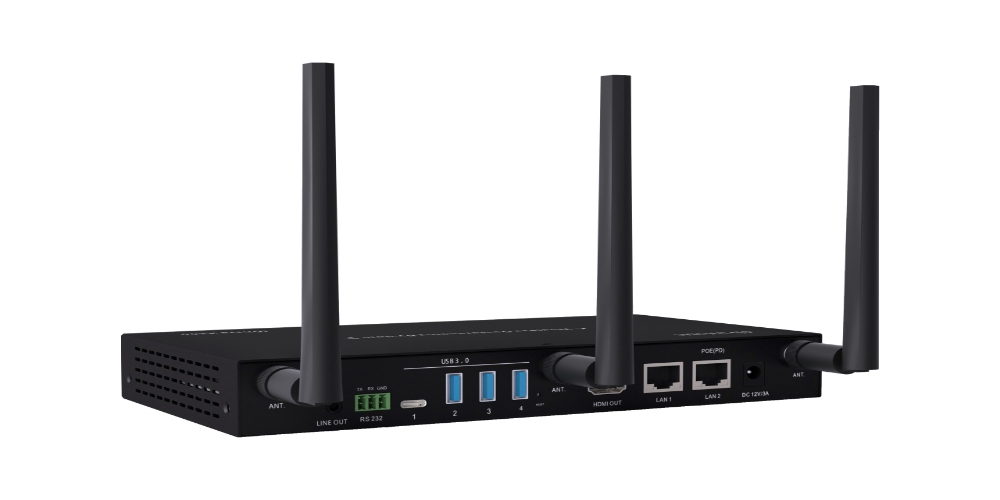
في إعداد BYOM ، يتجاوز النظام عرض الشاشة الأساسية. يسمح للكمبيوتر المحمول للشخص بالاتصال بدون أسلاك بالكاميرا والميكروفون والمكبرات الصوتية في مساحة الاجتماع. بغض النظر عن نوع أو نوع معدات الصوت والفيديو التي وضعت لأول مرة في الغرفة، يمكن للمستخدمين استخدام برامج العمل الجماعي المعتادة (مثل زوم أو Microsoft Teams أو Google Meet) مباشرة من أجهزتهم الخاصة. هذا النهج "مساحة الاجتماعات القائمة على البرمجيات" يوضح تماما الاشتباكات بين الأنظمة المختلفة. ونتيجة لذلك، فإنه يجلب حقا شعور "اتصل وبدء" الاجتماع.
لماذا هو BYOM اللاسلكي ضروري للتعاون الهجين؟
في مناطق العمل المزدحمة، لماذا يلاحظ تقنية BYOM اللاسلكية؟ السبب الرئيسي يكمن في السهولة القصوى والقدرة على التكيف التي تقدمها للناس:
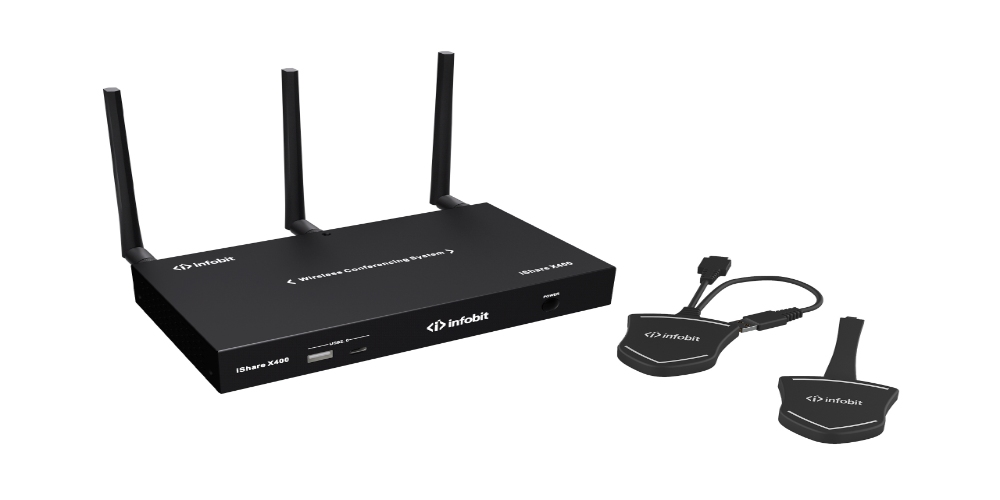
- منصة الغموض:لم يعد على الموظفين معرفة لوحات التحكم في مساحة الاجتماعات الصعبة. مع Wمفتاح BYOD BYOM، يمكن أن تتحول آلة أي عامل إلى المركز الرئيسي للجلسة. هذا النوع من الانحناء يساعد على زيادة الإنتاج كثيرا للمجموعات المختلطة التي غالبا ما تتغير بين أدوات العمل الجماعي.
- تجربة مستخدم متسقة:الناس دائما يعملون من خلال إعداد يعرفونه جيدا. لا’ تحتاج إلى تغيير طرقهم بسبب المساحة المحيطة بهم. لذلك ، يقلل هذا من وقت التعلم قبل بدء الجلسات. كما يقلل من عبء فرق تكنولوجيا المعلومات من الأسئلة التكنولوجية الصغيرة.
- التكامل البيئي السلس:على عكس أساليب الرابط السلكي القديمة ، يستخدم BYOM اللاسلكي تقنية نقل عرض النطاق الترددي القوي للتأكد من أن المكالمات إلى أجزاء الغرفة لا تتأخر كثيرا. هذا يعطي النجارين البعيدين مستويات الصوت والصورة كما لو كانوا هناك شخصيا.
يظهر الجدول أدناه السمات الرئيسية لإعدادات BYOM اللاسلكية:
|
فئة الميزة |
مقياس تقني |
أهمية الاجتماعات الحديثة |
|
بروتوكول الاتصال |
تعاون واي فاي / USB |
يزيل فوضى الكابلات للاتصال الفوري اللاسلكي |
|
التوافق المحيطي |
التلقائي رسم الخرائط كاميرا USB / ميكروفون |
يضمن أن أي كمبيوتر يمكن الاتصال بأجهزة الغرفة المهنية |
|
تكامل النظام |
ProAV التبديل السلس |
يضمن تدفقات AV مستقرة ويقلل من فقدان الإطار |
|
تفاعل المستخدم |
مزامنة البرمجيات والأجهزة |
يبسط العمليات ويسرع بدء الاجتماعات |
كيف يعزز Cursor BYOM تجربة التحكم في الاجتماعات؟
في أدوات الاجتماعات العليا، يرفع خيار مؤشر BYOM شعور العمل الجماعي إلى ارتفاعات جديدة. قلب هذه التكنولوجيا يرتكز على "ربط المؤشر اللاسلكي والتعامل معه". مع تكنولوجيا المؤشر BYOM ، لا يحتاج الناس إلى الاستيقاظ والذهاب إلى الشاشة. بدلاً من ذلك ، يمكنهم التعامل مع عناصر التحكم في الوسائط أو إعدادات الشاشة الكبيرة في منطقة الاجتماع مباشرة من مؤشر الماوس على الكمبيوتر المحمول.
هذا الخيار يعزز ذهاب وإياب في المحادثات كثيرا:
- التفاعل الدقيق:عند إعداد جدران فيديو مفصلة أو التغيير بين العديد من خطوط الإشارة، يمكن للمستخدمين النقر على البقع الدقيقة على شاشة الاجتماع من أجهزة الكمبيوتر المحمولة الخاصة بهم. إنهم يفعلون ذلك بسهولة كما لو كانوا يقفون أمامها.
- العمليات المتكاملة:من خلال إعداد مؤشر BYOM ، يمكن دمج معالجة الفيديو وتغييرات مستوى الصوت وتحولات الإشارة في سير عمل واضح واحد. هذا يزيل الجدار بين لوحات التحكم الحقيقية والأشياء الرقمية.
- تقليل التأخير:بالاعتماد على قواعد نقل ProAV الصلبة، يبقى وقت الرد على المؤشر عند العلامة الثانية الصغيرة حتى على الشاشات الحادة. وهذا الاستجابة المتساوية تسمح لأولئك الذين يقدمون المحادثات بإيلاء المزيد من الاهتمام للمواد.
كيفية بناء مساحة مكتبية قابلة للمستقبل مع قدرات BYOM؟
إنشاء منطقة عمل جماعي قوية يتطلب أكثر من برامج جيدة. كما يتطلب دعمًا قويًا للأجهزة. للاستفادة الكاملة من BYOM اللاسلكي، يجب على الشركات إيلاء الاهتمام لهذه الإعدادات الأساسية:
- تبديل المصفوفة وحدات:اختر أنظمة مفاتيح المصفوفة التي تتعامل مع تفاصيل عالية وتغييرات سلسة. تقف تكنولوجيا نقل ProAV الجيدة كجزء رئيسي للتأكد من أن العديد من الإشارات تبدأ دون’ t فلاش أو مظلمة في طرق العمل الجماعي المختلفة.
- اتصال عرض النطاق الترددي العالي:تأكد من أن الشبكة اللاسلكية في مساحة الاجتماع يمكن أن تدعم نقل بيانات الصوت والصورة عالية السرعة. وهذا يتجنب الانقطاعات من عرض النطاق الترددي المنخفض.
- تكامل USB-C:على الرغم من أن النقطة الرئيسية هي اللاسلكية ، في بعض الحالات ذات الإخراج القوي ، لا تزال نقاط رابط USB-C تعمل كإضافة جيدة للشحن الخلفي السريع ونقل البيانات.
استنتاج
تقنية BYOM اللاسلكية تتجاوز طريقة الرابط المفيدة. إنه يخدم كخيار ضروري لليوم’ الشركات لتحسين مهام المكتب وزيادة إنتاج العمل الجماعي. من خلال نقل معالجة الاجتماعات من الأجهزة الحقيقية الثقيلة إلى الآلات التي يعرفها الناس ، يمكن للشركات تقليل انتظار الجلسة من الأخطاء التقنية. وهذا يسمح للمجموعات بالتركيز أكثر على المحادثات الجديدة. على وجه الخصوص، استخدام تقنية مؤشر BYOM مزيج أكثر من الوجود الحقيقي هناك مع العرض الرقمي. يجلب للمستخدمين شعورًا بالسيطرة لم يسبق له مثيلًا. في هذا المجال، إنفوبيت أف يعمل بجد لتقديم أحدث أجهزة الإرسال / الاستقبال ProAV ، ومفتاحات المصفوفة ، وأنظمة العمل الجماعي اللاسلكية. هذه تساعد الشركات على إنشاء أماكن عمل جماعي أسرع وأفضل جاهزة للغد.
أسئلة متكررة
سؤال: ما هو BYOM وما هو اختلافه الأساسي عن BYOD؟
ج: يعني BYOM "جلب اجتماعك الخاص". يختلف عن BYOD ، الذي يتيح عرض الشاشة فقط. يجعل BYOM جهازك يتصل بدون أسلاك بجميع أجزاء التروس في مساحة الاجتماع ، مثل الكاميرات والميكروفونات. هذا يصل إلى مزيج كامل من البرمجيات والأجهزة.
س: لماذا تحتاج الشركات إلى حل BYOM لاسلكي؟
ج: يزيل مشاكل اللياقة بين مختلف منصات محادثة الفيديو ، مثل Teams و Zoom. يمكن لجميع الموظفين، بغض النظر عن الأداة التي يجلبونها، الانضمام إلى جلسة في لحظات. هذا يقلل الكثير من الضغط على صيانة تكنولوجيا المعلومات.
س: كيف تحسن تقنية مؤشر BYOM كفاءة العرض؟
ج: يسمح للمستخدمين بالتعامل مع شاشة الاجتماع أو إعداد مفتاح المصفوفة مباشرة مع ماوس الكمبيوتر المحمول. هذه الطريقة من ذهاب وإياب يعني أن أولئك المشاركة يمكنهم إدارة عناصر المحادثة دون الاستيقاظ. ونتيجة لذلك، تصبح الأسهم أكثر مهارة.
س: ما هي البنية التحتية ProAV المطلوبة لنشر BYOM اللاسلكي؟
ج: تحتاج إلى مفاتيح مصفوفة ProAV التي تدعم نقل عرض النطاق الترددي القوي وقواعد العمل الجماعي اللاسلكي عالية الإنتاج وأنظمة النقل التي تربط بشكل جيد مع أجزاء USB. هذه تتأكد من أن تغييرات الإشارة تحدث دون عوائق.
س: هل هناك مخاطر أمنية في اعتماد BYOM؟
ج: عادة ما تتضمن إعدادات BYOM العليا أقفال بيانات ضيقة وقواعد الوصول. يتأكدون من أن الروابط اللاسلكية تبدأ فقط في مناطق الاجتماعات المسموح بها. هذا يتوقف خارج الدخول ويحمي إعداد العمل الجماعي للأعمال.
