






この技術が急速に変化する時期には、オフィスの設置は固定された場所に限定されることはありません。ハイブリッド作業設定は、企業の一般的な選択肢となっています。この変化に伴い、会議室の改装はチームワークを緩める主要な障害となっている。多くの企業が共通の問題を処理している。従業員は会議エリアに入りますが、デバイスの不一致やプログラムの競合のため、多くの時間をかけて設定を修復します。この問題を解決するために、ワイヤレスBYOM(会議付き)技術が誕生した。リンクツールの方法を変えるだけではありません。実際には、会議の流れを簡素化することで、現在の企業のチームワーク設定を再構築しています。
BYOMは何を表していますか。BYODとの違いは何ですか。
チームワークの技術に触れたばかりの人の多くは、次のようによく質問します。 BYOMは何を表しているのか簡単に言えば、BYOMは「会議を持参する」という意味です。BYOD(デバイスを持参する)が始まると、主にノートパソコンの画面を大画面に表示させます。ワイヤレスBYOMは現在、ユーザーが追加の部品を処理できるように進化しています。
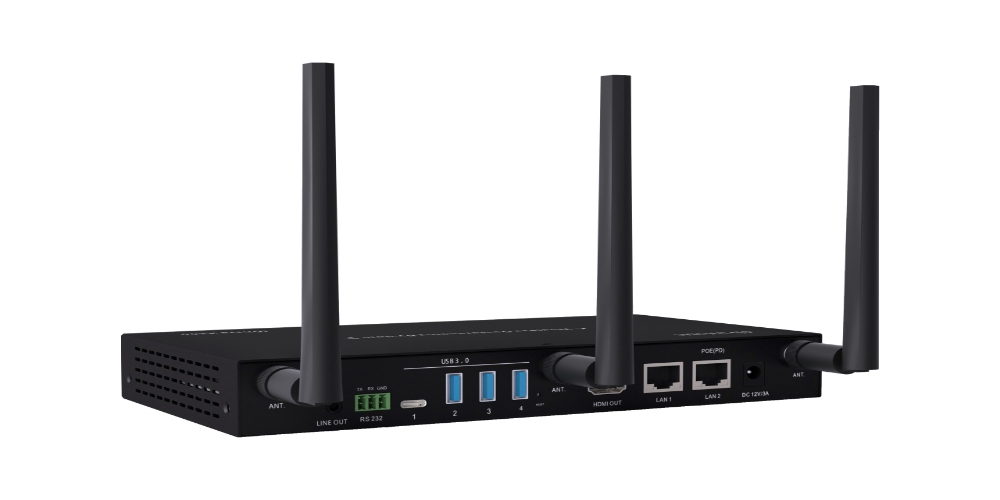
BYOM設定では、システムは基本的な画面表示を超えています。これにより、会議スペースのカメラ、マイク、スピーカーにケーブルなしで接続できるようになります。最初に部屋に置いたのがどのブランドやタイプのサウンドやビデオデバイスであっても、ユーザーは自分のマシンから自分がよく使うチームワークプログラム(Zoom、Microsoft Teams、Google Meetなど)を直接使用することができます。この「ソフトウェアベースの会議スペース」アプローチにより、さまざまなシステム間の競合が完全に解消されます。そのため、本当に「接続して開始する」という会議感覚をもたらします。
ワイヤレスBYOMがハイブリッドコラボレーションにとって重要なのはなぜですか。
忙しいワークエリアで、なぜワイヤレスBYOM技術が注目されているのでしょうか。主な理由は、ユーザーに最高の使いやすさと適応性を提供していることです。
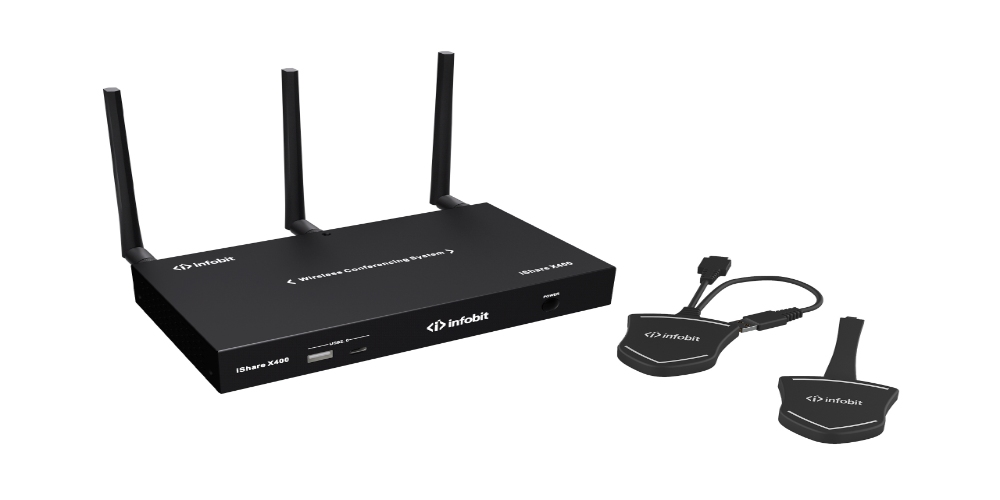
- プラットフォーム不可知論:スタッフは、苦手な会議スペースのダッシュボードを明らかにする必要はなくなりました。とともに W無線BYOD BYOMスイッチャ、どの労働者の機械も会話の中心になることができます。チームワークツールを切り替えることが多い混合チームにとって、この曲げは生産性を大幅に向上させるのに役立ちます。
- 一貫したユーザーエクスペリエンス:人々はいつも彼らの熟知した設定を通じて仕事をしている。彼らは持っていません。周りの空間によって彼らのやり方を変える必要はありません。そのため、授業開始前の学習時間が短縮されます。また、小さな技術問題に対するItチームの負担も軽減されます。
- シームレスな環境統合:従来の有線接続方法とは異なり、無線BYOMは強力な帯域幅伝送技術を使用して、部屋部分への通話にほとんど遅延がないことを保証している。これにより、遠くの参加者が自分でそこにいるように、声と画像レベルを提供します。
次の表に、ワイヤレスBYOM設定の主な特徴を示します。
|
機能カテゴリ |
技術指標 |
現代会議の意義 |
|
接続プロトコル |
Wi-Fi/USB連携 |
ケーブルの乱れを排除し、ワイヤレスで瞬時に接続可能 |
|
周辺互換性 |
USBカメラ/マイクの自動マッピング |
どのコンピュータでもプロのルームハードウェアを呼び出すことができることを確認します |
|
システム統合 |
ProAVシームレス切り替え |
安定したAVストリームを保証し、フレーム損失を低減 |
|
ユーザー・インタラクション |
ハードウェアとソフトウェアの同期 |
運用を合理化し、会議の開始を迅速化 |
Cursor BYOMはどのようにして会議の制御体験を強化しますか。
トップレベルの会議ツールでは、カーソルBYOMオプションにより、チームワーク感が新たな高さに向上しました。この技術の核心は「無線カーソルリンクと処理」にある。カーソルBYOM技術があれば、人々は画面に立ち上がる必要はない。代わりに、ノートブックPCのマウスポインタを使用して、会議スペースでメディア制御や大画面設定を処理することができます。
このオプションは、交渉の往復を大きく促進します。
- 正確な相互作用:詳細なビデオウォールを設定したり、複数の信号線を切り替えたりすると、ノートパソコンから会議画面上の正確な位置をクリックすることができます。彼らはその前に立つように簡単にこのことをする。
- 総合運営:カーソルBYOM設定により、ビデオ処理、サウンドレベルの変更、信号変換を明確なワークフローに統合することができます。これにより、実際のダッシュボードとデジタルプロジェクトの間のギャップが解消されます。
- 遅延を減らす:信頼性の高いProAV伝送ルールにより、クリアな画面でもカーソル回復時間は小さな秒マーカーに維持されます。このような均一な対応により、スピーチをしている人たちは材料に注目しています。
BYOM機能を備えた未来志向のオフィス空間を構築するには?
強力なチームワークエリアを構築するために必要なのは、良い計画だけではありません。また、堅牢なハードウェアサポートも必要です。ワイヤレスBYOMを活用するために、企業は次の基本設定に注意する必要があります。
- モジュラーマトリクス切り替え:高詳細および滑らかな変化を処理するマトリックススイッチシステムを選択します。良好なProAV伝送技術は多くの信号の起動を確保する主要な部分であり、さまざまなチームワークで点滅したり暗くしたりしないでください。
- 高帯域幅接続:会議スペース内のワイヤレスネットワークが、高レートの音声および画像データ転送をサポートできることを確認します。これにより、低帯域幅による中断が回避されます。
- USB-C統合:主要ポイントはワイヤレスですが、強い出力の場合もあれば、USB-C接続ポイントは急速な逆充電とデータ移動のための良好な追加コンポーネントとして使用できます。
結論
無線BYOM技術は便利なリンク方法を超えている。それは今日の必須の選択です。企業がオフィスタスクをよりよく遂行し、チームワークの生産性を向上させるのを支援します。会議処理を重型の実際のハードウェアからよく知られているマシンに移行することで、企業は技術的な障害による会議の待ち時間を減らすことができます。これにより、各団体はより新しい交渉に集中することができます。特に、カーソルBYOM技術を使用して、実際の存在とデジタル表示をさらに結合します。これはユーザーにかつてない制御感をもたらします。この領域では、 インフォビット AV 最新のProAV送信機/受信機、マトリックススイッチ、およびワイヤレスチームワークシステムの提供に努めます。これらの支援により、企業は明日のチームワークの準備をより迅速に、より良いものにすることができます。
よくある質問
Q:BYOMは何を表していますか。BYODとの根本的な違いは何ですか。
A:BYOMは「会議を持参する」という意味です。BYODとは異なり、BYODは画面に表示させるだけです。BYOMにより、マシンはカメラやマイクなど、会議スペース内のすべてのデバイス部品にワイヤなしで接続できます。これにより、ソフトウェアとハードウェアの完全な混合が達成されます。
Q:なぜ企業が無線BYOMソリューションを必要とするのか?
A:TeamsとZoomなどのさまざまなビデオ通話プラットフォーム間の適切な問題を解決します。すべての従業員は、どんなツールを持っていても、いつでも会議に参加できます。これにより、ITメンテナンスのストレスが大幅に軽減されます。
Q:カーソルBYOM技術はどのようにプレゼンテーションの効率を高めますか?
A:ノートパソコンのマウスを使用して、会議画面やマトリックススイッチの設定を直接処理することができます。この行き帰りの方法は、共有している人が起きずに会話の内容を管理できることを意味します。そのため、株はより熟練したものになった。
Q:無線BYOMの導入に必要なProAVインフラストラクチャは?
A:強力な帯域幅伝送、高出力ワイヤレスチームのコラボレーション基盤、USBコンポーネントと良好に接続された伝送システムをサポートするProAVマトリックススイッチャが必要です。これらは信号の変化がスムーズに発生することを保証します。
Q:BYOMの採用にはセキュリティ上のリスクはありますか?
A:トップBYOM設定には通常、厳格なデータロックとアクセス規則が含まれています。彼らは、ワイヤレス接続が許可された会議エリアでのみ開始されることを確認します。これにより、外部からのアクセスが阻止され、ビジネスチームのコラボレーション設定が保護されます。
