







iControl K06 Central Controller Overview
Check what benefits the iControl K06 brings to you...


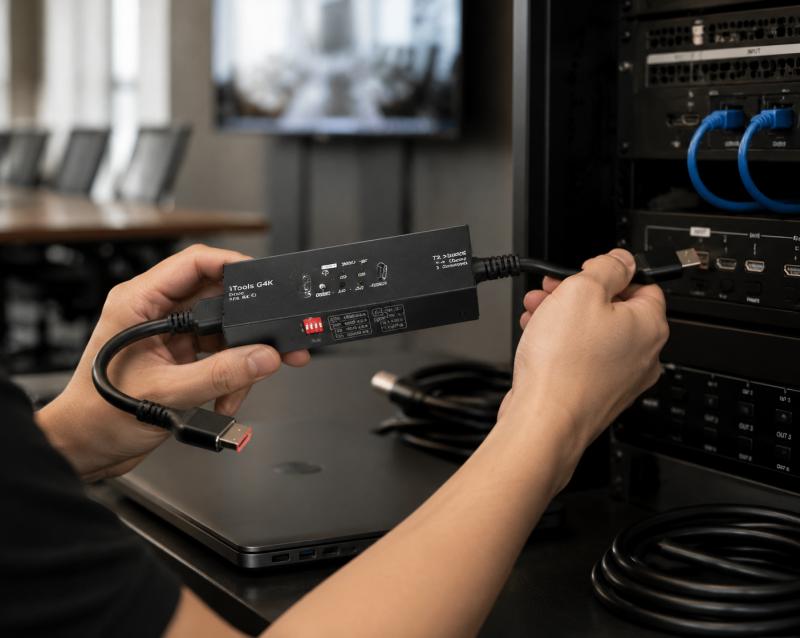
Modern AV system deployment requires precise signal verification across multiple connected devices, especially in environments where HDMI-based transmission chains include matrices, extenders, and distributed displays. As system complexity increases, installation teams often face issues such as black screens, resolution mismatch, or HDCP and EDID communication failures. To reduce uncertainty in the field, INFOBIT AV engineering team provides professional diagnostic solutions designed for integrators who need reliable, repeatable testing workflows. Among these tools, HDMI-based signal generation and analysis play a central role in improving installation efficiency and system stability.
AV integration projects today rely on multiple interconnected devices where a single failure can affect the entire system output. In such environments, AV integrator tools are used to validate signal paths before final commissioning. These tools allow installers to simulate real operational conditions without relying on end-user devices.
As part of our engineering approach, we focus on enabling technicians to isolate problems quickly across HDMI chains. This reduces time spent on troubleshooting and eliminates uncertainty during system deployment.
HDMI-based testing is especially important in multi-display environments, signal distribution systems, hybrid meeting room infrastructure, and HDBaseT transmission networks. By introducing controlled signal testing, integrators can confirm system stability before full-scale deployment.
An HDMI tester is used to verify both signal output and signal reception across AV systems. In real-world installation scenarios, most issues are not caused by a single device failure, but by communication mismatches between devices.
Signal generation mode enables controlled output of standardized video signals to verify whether downstream devices can correctly receive and process HDMI input.
Signal analysis mode allows technicians to simulate a display and inspect incoming HDMI data, including resolution behavior and handshake status.
This dual-function approach helps AV teams confirm system behavior at both ends of the signal chain.

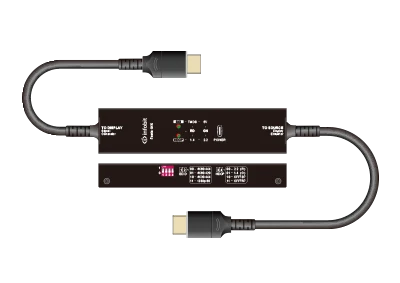
Die iTools G4K from INFOBIT AV is designed as a portable HDMI signal generator and display emulator, combining both generation and analysis functions in a compact structure. It is built for field technicians and AV integrators who require fast diagnostic feedback during installation and maintenance tasks.
It supports HDMI 2.0 signal transmission and provides multiple resolution configurations for testing system compatibility under different conditions.
The device integrates:
This combination allows installers to evaluate both signal integrity and device compatibility in a single tool.
To support structured AV deployment, the iTools G4K provides defined signal testing parameters that align with professional installation requirements. The supported configurations are designed for compatibility testing across commercial AV systems.
|
Category |
Configuration Options |
|
Resolution Output |
4K@60Hz 4:4:4, 4K@60Hz 4:2:0, 4K@30Hz 4:4:4, 1080p@60Hz |
|
HDMI-Version |
HDMI 2.0 |
|
HDCP Support |
HDCP 1.4 / HDCP 2.2 |
|
Audioformat |
2CH PCM (via EDID modes) |
|
Stromversorgung |
USB-C DC 5V |
|
Stromverbrauch |
Max 1W |
These configurations allow AV teams to validate system behavior under different resolution and encryption conditions commonly found in commercial environments.
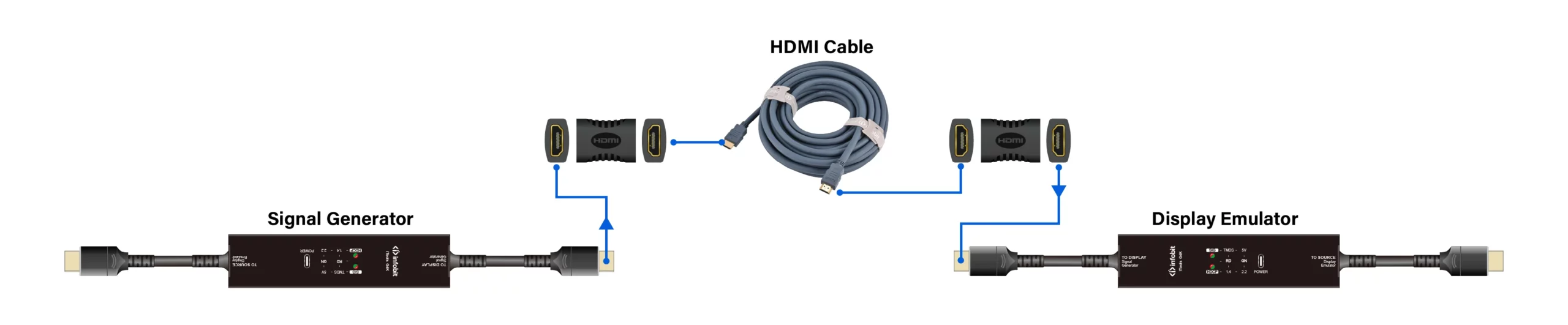
EDID communication is a key factor in HDMI system stability. When devices fail to negotiate display parameters correctly, issues such as black screens or incorrect resolution output often occur.
Die iTools G4K integrates EDID management through a hardware-based 4-position DIP switch system. This allows integrators to manually define system output behavior during testing.
Supported EDID configurations include:
By controlling EDID settings directly, installers can quickly determine whether signal issues are caused by source devices or display compatibility limitations.
HDCP compatibility is a common cause of signal interruption in professional AV environments. When encryption standards between devices do not match, video output may fail completely.
Die iTools G4K supports HDCP 1.4 and HDCP 2.2 detection, allowing integrators to identify encryption mismatches during installation.
The DIP switch configuration also enables HDCP testing modes:
This functionality helps installers determine whether system failures are caused by encryption conflicts or hardware limitations.
In real deployment scenarios, AV integrators use HDMI tester tools across multiple stages of installation. The iTools G4K supports testing workflows in structured environments such as HDMI matrix system deployment, HDBaseT transmission testing, cable and infrastructure validation, and display emulator diagnostics.
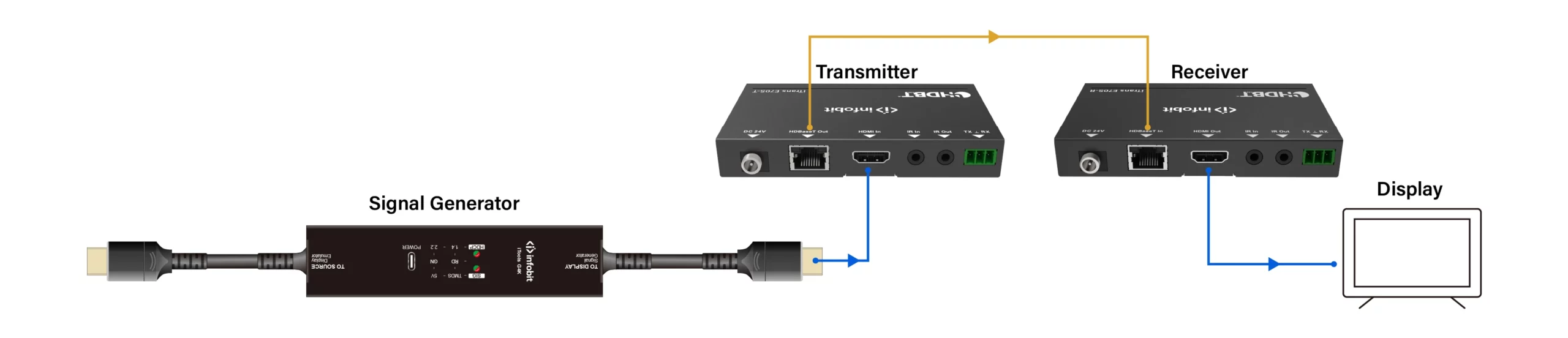
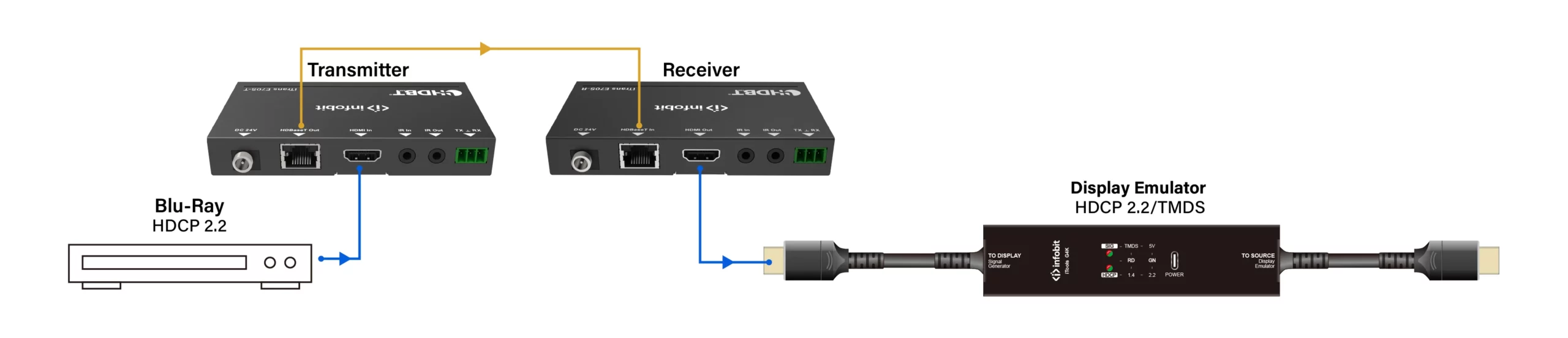
Signal generation is used to verify input and output routing stability across matrix switching systems. The device is also used to validate signal integrity between transmitters and receivers in extended HDMI over HDBaseT systems, confirming stable transmission behavior.
Before final installation, integrators use signal output testing to verify HDMI cable performance and identify faulty or incompatible wiring. By simulating a display endpoint, technicians can also verify source device output behavior and detect handshake failures at early stages.
Using structured AV integrator tools improves installation efficiency in several measurable ways. Based on field usage scenarios, the primary benefits include reduced troubleshooting time during commissioning, faster isolation of signal chain faults, improved accuracy in EDID and HDCP diagnostics, lower risk of post-installation system failure, and more efficient verification of multi-device integration.
These benefits are especially important in large-scale AV deployments where system downtime directly impacts operational cost.
We design our Pro AV tools with a focus on real installation challenges faced by integrators, system engineers, and field technicians. Our approach emphasizes practical signal validation, compatibility testing, and system reliability across professional AV environments.
With global distribution and extensive Pro AV experience since 2009, we continue to support integrators with tools designed for real-world installation workflows, not just laboratory conditions.
Efficient AV installation depends on accurate signal validation across every stage of system deployment. HDMI tester tools such as iTools G4K provide integrators with the ability to simulate, analyze, and verify HDMI signal behavior in real time. By combining signal generation, EDID management, and HDCP detection, installation teams can significantly reduce system uncertainty and improve commissioning efficiency.
For project support, technical consultation, or quotation requests, INFOBIT AV provides direct engineering assistance and fast response services. You can contact us or submit your project requirements for evaluation and pricing through our official platform.
An HDMI tester is used to generate and analyze HDMI signals, helping integrators verify resolution compatibility, signal stability, and device communication during installation.
EDID defines display capabilities between devices. If EDID negotiation fails, systems may show black screens or incorrect resolution output.
Signal generators are used to simulate HDMI sources and test transmission quality between HDBaseT transmitters and receivers.
HDCP testing helps identify encryption mismatches that can block video output in protected content playback systems.
It reduces troubleshooting time by combining signal generation, display emulation, EDID control, and HDCP verification in one portable device.
Bitte hinterlassen Sie Ihre Anforderungsdaten unten, damit wir Sie sofort kontaktieren können.
