







Nos quartos de controle de hoje, entradas da empresa e lojas de escala superior, envolvimento de configurações visuais formam o coração de mostrar informação. Muitas pessoas pensam que a qualidade da tela depende principalmente da resolução ou brilho sozinho. No entanto, na verdade, a força da unidade de processamento central molda o resultado final dos visuais. Mesmo com telas costosas, sem um centro de processamento robusto, problemas como divisão de imagens, atrasos ou incumprimentos de tempo geralmente surgem. - Gravando o caminho controlador de parede de vídeos funciona o hardware é essencial para criar configurações de visualização confiáveis.
O que é um controlador de parede de vídeo e como funciona?
Um controlador de parede de vídeo serve como a mente central de um arranjo multitela. Seu trabalho principal envolve pegar sinais de diferentes fontes. Então, trata de mudar o tamanho, cortá-los e espalhá-los através de métodos de processamento integrados. No final, assegura-se que as fotos permaneçam inteiras e uniformes quando se juntam a várias telas.
Hardware forte de controlador de parede de vídeo vai além de simples compartilhamento de sinais. Ele gerencia cores, camada múltiplas imagens e troca fontes suavemente. Em condições exigentes, o poder fraco do controlador pode causar blocos no fluxo de sinais. Isso pode até levar a falhas na tela, que prejudicam o quão bem a informação passa.
Por que a arquitetura do hardware importa para o desempenho do exibidor?
A qualidade de construção da configuração do hardware afeta diretamente a estabilidade contínua e a agudez da imagem no display.
- Processo de Força e Atraso: Hardware sólido reduz muito o tempo de manipulação de sinais. Como resultado, o conteúdo mostrado permanece estreitamente acompanhado com a entrada durante os controles de dados ao vivo ou planejamento de tarefas. Isso evita qualquer lentidão notável nos visuais.
- Difícil confiabilidade para o uso da indústria: As paredes atuais de vídeo geralmente correm ao redor do relógio. hardware especial com potencia de segurança e bom controle de calor impede quebrações de calor ou surtos. Assim, mantém o grupo de tela funcionando sem interrupção.
- Potencial de crescimento: Os melhores projetos de hardware permitem adições fáceis através de módulos. Os usuários podem simplesmente expandir adicionando cartões de entrada ou saída. Isto se adapta às necessidades crescentes ou mudanças na configuração.
Como os diferentes tipos de controlador comparam?
Escolhar um controlador significa saber as diferenças entre vários edifícios. A tabela abaixo olha para opções típicas de hardware:
|
Tipo de controlador |
Características chave |
Escenários de aplicações |
|
Controlador de parede HDMI |
Entrega focada do caminho HDMI; - boa resistência às perturbações |
Imagens de saúde, áreas básicas de relógio, espaços de conferências de negócios |
|
Controlador de vídeo incorporado |
Bem combinado; - tamanho compacto; uma estrutura simples |
Pantallas pequenas, compram sinais digitais |
|
Processor multiecrã modular |
Trata de sinais variados (SDI/Fibre/HDMI); Grande adaptabilidade |
Grandes centros de operação, pontos de controle de trânsito |
O que é um controlador de parede HDMI?
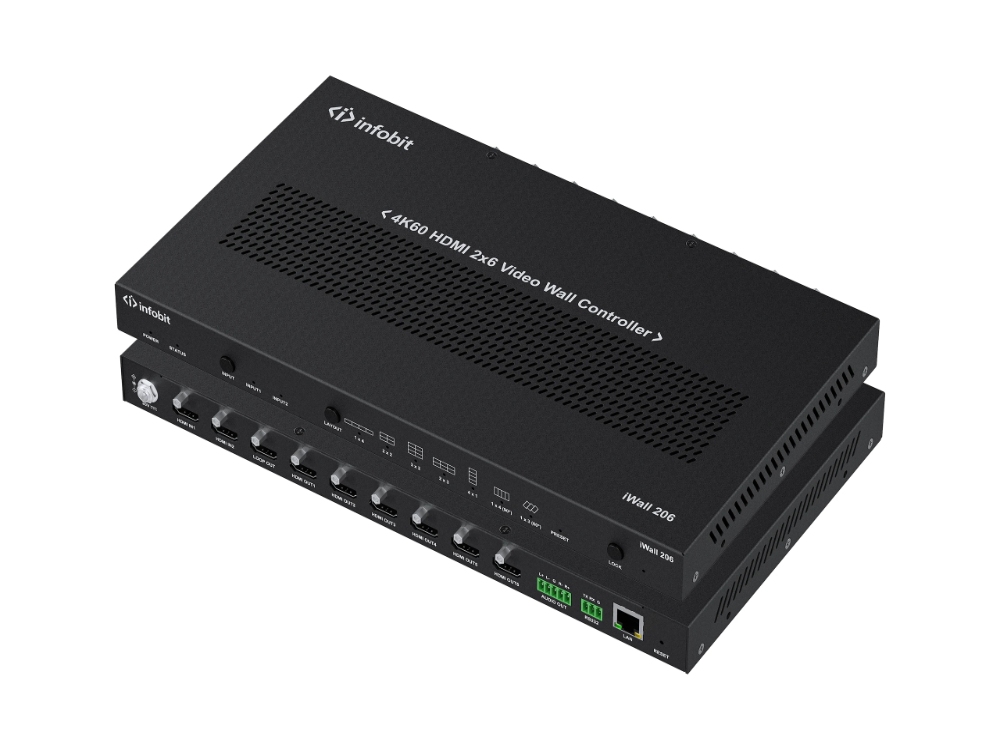
Opções de controlador de parede HDMI vêem amplo uso no campo devido ao seu tratamento constante de sinais. Essas unidades são finas para sinais HDMI de alta capacidade. Eles garantem uma transfer ência digital clara sem perda. Por exemplo, processores modulares se baseiam em computação forte para gerenciar 4K@60Hz - entradas. Ao mesmo tempo, eles oferecem processamento separado e claro para cada área de saída. Isso mantém as fotos crisp e cores verdadeiras, mesmo através de longos alcances. Para manter essa qualidade sobre correntes de cabo extendidos, profissionais muitas vezes parejam o controlador com um controlador de alta qualidade Extensores HDMI.
O que é um controlador de vídeo incorporado?
Por outro lado, um controlador de vídeo incorporado enfatiza design simples e mistura. Essas ferramentas geralmente construem lógica de exibição direta para a configuração principal. Isso corta pontos fracos de fios externos. Para esforços visando arranjos limpos, esses controladores diminuem os problemas de configuração. Eles também tornam a manutenção mais clara e mais fácil.
Que características do hardware chave deveria procurar?
Ao verificar Creativo Videia Wtodos Ccontroladors hardware, certas especificações são os principais sinais de um sistema sólido:
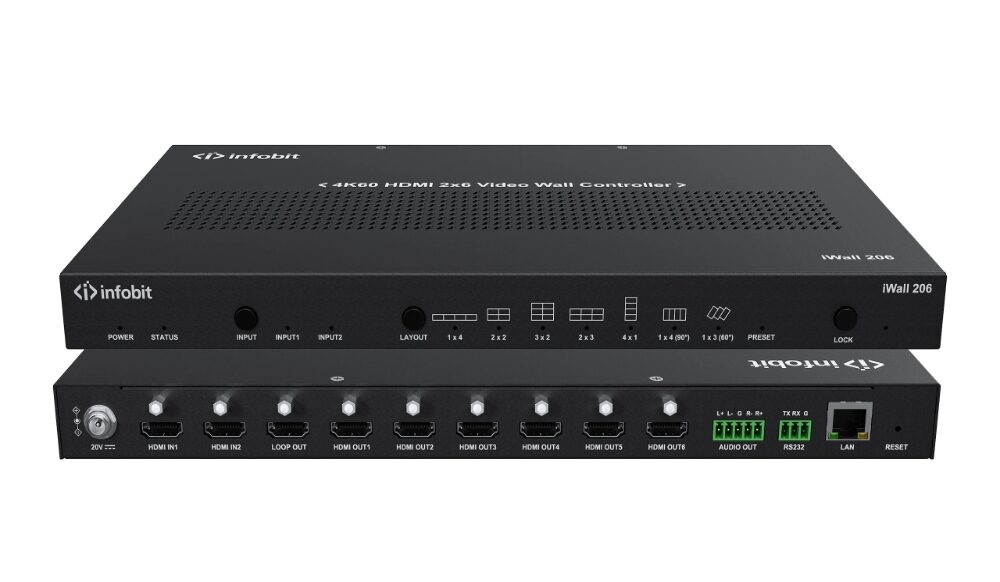
- Capacidade de troca suave: Durante as mudanças de fonte, a configuração precisa evitar telas escuras ou flashes. Dessa forma, os observadores não sentem nenhuma quebra no fluxo.
- Conexão: A ligação profunda com configurações comuns de controle (como RS-232 ou redes IP) forma o quão fácil é usar.
- Timing Sync Tech: Os métodos Gen-Lock reduzem os atrasos através dos caminhos de saída. Eles impedem que os vídeos quebram quando se espalham sobre telas. Isso prova-se vital para uma brincadeira clara.
Como escolher o hardware certo para sua aplicação específica?
Selecionar a melhor opção exige ponderar os custos em função das características necessárias. Para aqueles que procuram melhores resultados, um controlador de parede HDMI com uma construção modular geralmente funciona melhor. Ela permite atualizações simples às conexões mais tarde. Para formatos de tela estáveis, um controlador de vídeo incorporado capaz geralmente oferece valor mais forte para dinheiro.
Também pensem na variedade de sinais de entrada. Se o trabalho incluir feeds de câmaras SDI, compartilhamento de tela de computador e correntes online, escolha o hardware de controlador de parede de vídeo que gerencia bem as entradas misturadas. Isso serve como a escolha mais inteligente para uso duradouro.
Conclusão
No final, o forte efeito visual de uma parede de vídeo vem de mais do que apenas painéis de tela. Também depende do poder de processamento escondido. Seja um controlador de parede de vídeo HDMI confiável ou um controlador de vídeo incorporado compacto, apoio de hardware especializado assegura um programa de conteúdo sem defeitos. - Colocar dinheiro em equipamentos confiáveis no início reduz as despesas de manutenção ao longo do tempo. Também abre espaço para o crescimento empresarial à frente.
Se você busca reparações de peritos para aumentar a qualidade da tela do seu projeto, o INFOBIT AV oferece soluções de controle da parede de vídeo de maior grau industrial e troca de matriz. Nós nos focamos em forte manejo visual para todo tipo de equipe primária e áreas de exibição. Liguem agora à nossa equipe tecnológica para conselhos de configuração de hardware personalizados para seu trabalho.
FAQ
Q: Por que um controlador dedicado é melhor que um cartão gráfico de computador para sistemas de parede de vídeo?
A: Controladores dedicados muitas vezes dependem de construções de hardware puras (FPGA), que permanecem muito estáveis e ignoram mudanças de OS, choques de condutor ou riscos de malware. Os cartões gráficos, no entanto, tendem a atrasar de cargas pesadas e acham difícil gerenciar enormes empregos de união e tempo.
Q: Como escolher um controlador adequado da parede HDMI?
A: Começa avaliando seu número de entradas e tamanho da tela de saída. Descobre se é necessário manipular 4K. - Verifique se o controlador oferece uma "troca sem fios" e tem pontos modulares. Esses permitem adicionar tipos de sinais mais tarde, como SDI, DVI ou fibra, baseados em necessidades futuras.
Q: Um controlador de vídeo incorporado é adequado para operação 24/7?
A: Sim. Controladores incorporados de qualidade utilizam peças industriais duras feitas para trabalho sem parar. Eles incluem controle inteligente de calor e software firme, que completamente correspondem às exigências duras dos centros de relógio ou sistemas de informação públicos para funcionamento constante.
Q: Que problemas de interferência de sinais devem ser notados ao instalar hardware de controlador de parede de vídeo?
A: As perturbações de sinais geralmente decorrem de fios de baixo grau ou correntes de longo demais. Opção para cabos protegidos fortes e limitar comprimentos HDMI quando possível. Para mais distâncias, escolha os convertedores de fibras parejados do hardware ou as opções HDBaseT. Eles mantêm os sinais claros em plena capacidade.
Q: Qual é a tecnologia Gen-Lock nos controladores de paredes de vídeo?
A: A tecnológica Gen-Lock (Generator Locking) desempenha um papel chave em combinar o tempo de todos os sinais de saída em uma parede de vídeo. Ela elimina pausas de imagem durante vistas multiecrã e mantém o fluxo do vídeo equilibrado. Isso faz com que seja necessário para salas de operação avançadas e espaços de transmissão pro.
