







iControl K06 Central Controller Overview
Check what benefits the iControl K06 brings to you...


A BYOM meeting room needs more than a laptop cable. Users expect to bring their own device and still use the room’s camera, microphone, speakers, and displays without having to change several connections. At INFOBIT AV, we see this as a signal-routing challenge for professional AV projects. A USB matrix helps route shared USB peripherals between a fixed Room PC and a guest laptop, while the iMatrix HU44 also integrates HDMI, USB, and audio matrix functions into a single device.
A USB matrix is a hardware device that allows multiple host computers, such as laptops or PCs, to share multiple USB peripherals in different routing combinations. In a BYOM meeting room, those peripherals can include cameras, microphones, keyboards, mice, speakers, or USB storage devices.
A standard USB switch usually lets one computer use all connected devices at a time. A USB matrix works differently because it supports independent routing. One host can use one USB device while another host uses another device. This is important in meeting spaces where a Room PC and a guest laptop may both need access to installed room equipment at different times.
This routing structure reduces the need for manual cable changes. The camera, microphone, and speaker system can stay connected to the matrix, while the active host changes according to the meeting requirements.
BYOM relies on flexible access to professional room equipment. A fixed Room PC may normally run the meeting room system, but a visitor may need to host a call from a personal laptop. Without a Comentarios sobre: AOC-HDMI-AA8K-xx, the user may need to unplug and reconnect several USB cables before the meeting can begin.
A USB matrix allows a single set of room equipment, including 4K cameras, beam-forming microphone arrays, and specialized speaker systems, to move between the Room PC and the guest laptop. This makes the meeting room easier to use because the user does not need to understand the physical wiring behind the system.
For B2B projects, this is not just a user comfort issue. It affects room readiness, training needs, and support workload. A cleaner switching process helps AV managers keep rooms available for more users with fewer setup problems.
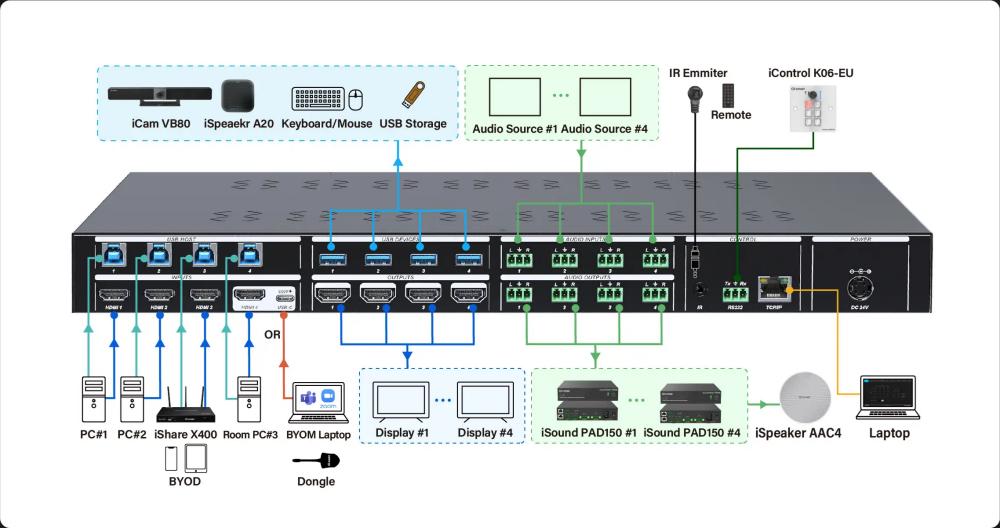
A USB matrix supports Room PC (eg. Microsoft Teams Room, MTR) and guest laptop switching by assigning USB peripherals to the active host. The Room PC can use the installed camera and microphone during standard room meetings. When a guest connects a laptop, the same peripherals can be routed to that laptop.
This is useful when users need different meeting software. A room may normally run one platform, but a guest may need to use Microsoft Teams Rooms MTR, Google Meet, or Webex from a laptop. The USB matrix helps transfer USB peripheral access from the Room PC to the guest laptop, so the user can run the meeting through the preferred software.
The key value is consistency. The room equipment stays in place, and the routing changes inside the system. This helps protect the installation from frequent cable movement and keeps the meeting table cleaner.
Single-cable USB-C access makes a BYOM meeting room easier to operate. Modern USB-C matrix switchers can let a user connect a laptop through one USB-C cable and gain control of the room AV system. The laptop can then use the room camera and microphone as if they were built into the device.
O iMatrix HU44 supports USB-C 4K60Hz AV input and provides up to 60W PD charging for USB-C. This allows a BYOM connection to support AV input and laptop charging through the same USB-C path, depending on the project design.
For integrators, this reduces visible cabling. For users, it reduces the steps needed before a meeting starts. The room becomes easier to explain, easier to operate, and easier to keep organized.
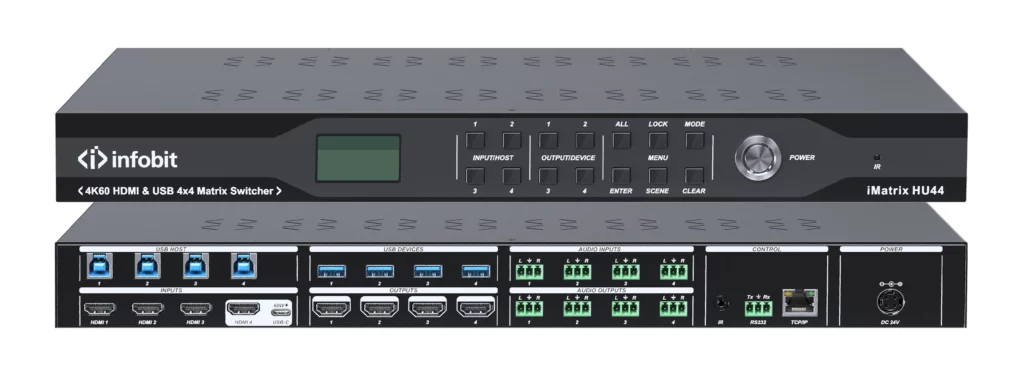
O iMatrix HU44 is designed for projects that need more than basic USB peripheral sharing. It is a hybrid matrix switcher with 4×4 HDMI seamless matrix, 4×4 USB 3.0 matrix, and 8×8 audio matrix functions.
This matters because many BYOM meeting rooms need to route video, USB peripherals, and audio together. The device supports video signals up to 4K@60Hz 4:4:4 and supports analog audio embedding and de-embedding. It can separate audio from HDMI signals for independent audio and video output requirements.
|
Project need |
iMatrix HU44 function |
BYOM meeting room value |
|
Share USB peripherals |
4×4 USB matrix |
Routes USB devices between Room PC and BYOD PC |
|
Route meeting video |
4×4 HDMI matrix |
Supports multiple HDMI inputs and outputs |
|
Manage audio signals |
8×8 audio matrix |
Supports independent audio routing |
|
Connect guest laptop |
USB-C 4K60Hz input |
Supports BYOM laptop access |
|
Keep laptop powered |
Up to 60W USB-C PD |
Supports charging through USB-C |
|
Simplify control |
Front panel, IR, RS-232, Web-GUI |
Fits different project control needs |
This integrated approach can reduce the need for separate devices in meeting room designs. It gives integrators one platform for video, USB, and audio routing.
Buyers should first confirm the number of hosts and USB devices in the room. A BYOM meeting room normally needs at least one Room PC connection and one guest laptop path. The system should also support the required cameras, microphones, speakers, and other USB devices.
Port structure should match the design. The iMatrix HU44 includes HDMI 2.0 AV input and output ports, USB-C AV input, USB 3.0 host and device ports, TCP/IP, RS232, IR, and line audio input and output. These interfaces give integrators the required connection points for professional room layouts.
Control also matters. The iMatrix HU44 supports front panel buttons, IR, RS-232, and TCP/IP Web-GUI control. This allows local operation, remote operation, browser-based management, and integration with control systems. The device also supports separated presets for video switching, USB switching, and audio switching.
Cable management improves daily use because users do not need to handle the installed USB devices directly. A USB matrix centralizes the USB connections in one location, often behind a display or under a table. The visible room interface can remain simpler.
In a BYOM meeting room, this helps avoid confusion between the camera, microphone, display, and charging cables. Users can focus on joining the meeting, while the matrix manages the routing behind the system.
A cleaner installation also helps maintenance. When peripherals remain connected to the matrix, support teams can troubleshoot through a more organized signal path instead of checking several loose user-side cables.
A USB matrix improves a BYOM meeting room by making USB peripheral sharing, Room PC switching, guest laptop access, USB-C connection, platform flexibility, and cable management easier to control. The iMatrix HU44 adds HDMI, USB, and audio matrix routing for projects that need a more complete AV switching system. At INFOBIT AV, we support professional AV integrators and buyers with solutions for meeting room signal routing and collaboration spaces. For project consultation or an online quote, visit INFOBIT AV.
You can prepare the number of host computers, USB devices, HDMI inputs, HDMI outputs, audio ports, and control methods before requesting a quote. This helps confirm whether a USB matrix or a full HDMI USB audio matrix is the better fit.
You should confirm whether the room needs 4×4 HDMI matrix switching, 4×4 USB matrix routing, 8×8 audio matrix routing, USB-C 4K60Hz input, 60W PD charging, Web-GUI control, RS-232 control, CEC display control, and EDID settings.
Yes. A USB matrix can route room USB peripherals from the Room PC to the guest laptop. This allows the laptop to use the room camera and microphone when the guest runs Microsoft Teams, Google Meet, or Webex.
O iMatrix HU44 supports front panel buttons, IR, RS-232, and TCP/IP Web-GUI control. These options allow simple local operation and professional system integration.
Por favor deixe seus detalhes de demanda abaixo para que possamos contactar imediatamente com vocês.
