





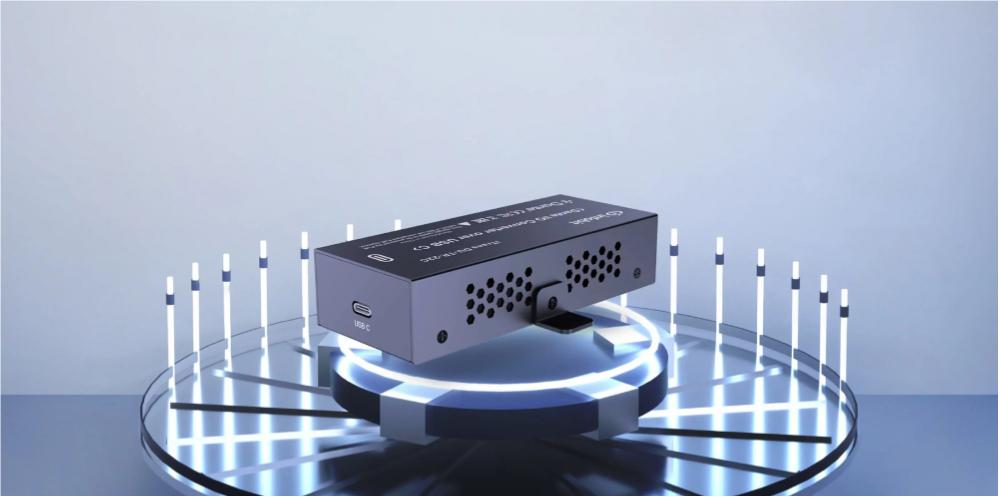
In a meeting room, the microphones and ceiling speakers stay put while the presenter’s computer changes. The interface has one job: let that temporary host join the room’s audio path.
The iTrans DU-TR-22C (v2) from INFOBIT AV joins that host over USB-C and offers two channels in and two out. Port compatibility matters, but so does the call: is audio needed in both directions, and which application will use it?
The Computer Connection and the Fixed Room
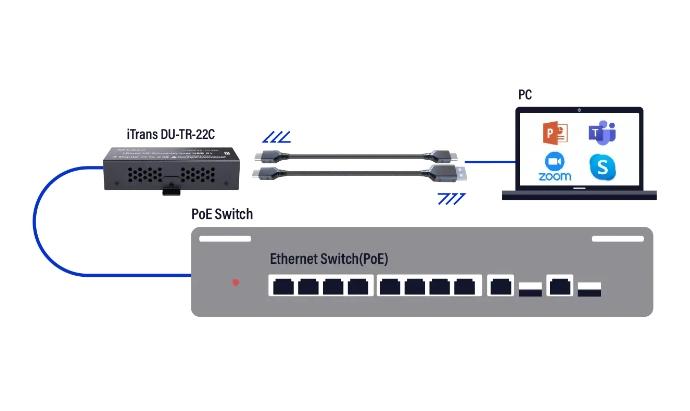
USB is the short link to the laptop; Dante is the route into the fixed installation. That division lets the host change while the DSP, room microphones, amplifiers, and loudspeakers remain where they are.
Audio Format and Host Support
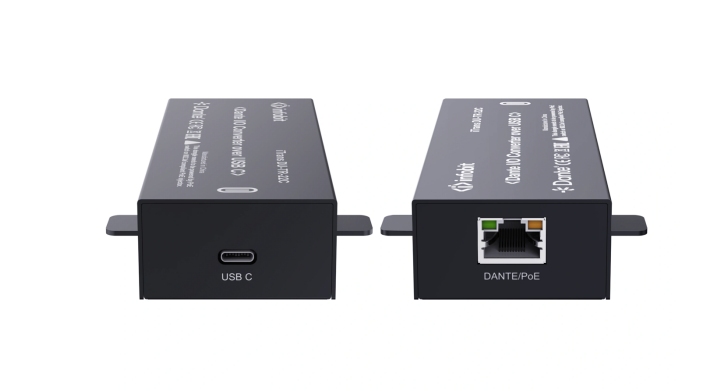
The DU-TR-22C (v2) handles 2×2 audio at 24-bit and 48 kHz. PC and Mac recording or playback require no additional software. It is plug and play; 802.3af PoE is supported, and both USB-C-to-C and USB-C-to-A cables are included.
Application Device Selection
In the room schedule, name the audio coming into the computer and the audio leaving it. Then check the call application’s selected mic and speaker; a media player can use different devices.
When a USB-C computer needs audio in both directions, check whether the USB-C Dante I/O transceiver matches its channel plan.
Treat the laptop as a guest endpoint in the room design. It may be replaced between meetings, so the USB cable should be obvious to the user while the network-side connection remains part of the fixed installation. The interface sits between those two working areas; that is why a Dante USB interface should be evaluated alongside the room’s source and return channels.
Two Audio Directions in a Meeting
In the channel plan, the far-end voice stops at the room speakers; local microphones head toward the computer. Keep the two paths apart so the speakers are not returned to the call.
A remote listener and someone in the room can verify the path quickly. Have them speak in turn and watch the meters for a loop.
Once USB is up, confirm the named channels are subscribed in the required directions. Reuse the room schedule names when the host changes.
A two-way call needs a short route list that the installer can compare with the application:
Local microphone mix to the computer input.
Remote or program audio from the computer to the room output.
A return mix that excludes the remote audio already arriving from the call.
USB Cable and Power at the Table
The device takes USB-C. C-to-C and C-to-A leads are supplied, so designate which stays at the table and mark it for the expected host.
Power may come through IEEE 802.3af PoE or the computer’s USB port. If the installation adds a hub or extension, include it in the power check.
A rack installation needs a documented USB run to the user position; a table installation needs an easy-to-find lead. In either layout, make a loose USB connection obvious before troubleshooting Dante.
For USB to Dante, the host path matters as much as the interface port. Choose the supplied C-to-C or C-to-A lead for the room’s computer fleet, keep it at the connection point, and test that combination. Any adapter the user must bring should be stated in the room requirements.
USB-C and USB-B Across the Computer Fleet
Check the actual host ports first. The USB-B DU-TR-22B handles microphone input and speaker output, with 24-bit rates of 44.1, 48, or 96 kHz and AES67 RTP transport.
Their rate support differs. DU-TR-22C (v2) runs at 48 kHz; DU-TR-22B supports 44.1, 48, or 96 kHz. Check project rate and transport alongside direction, port, and power.
For the USB-B model, see the USB-B Dante encoder decoder and compare its host connection with the room standard.
The DU-TR-22C (v2) and DU-TR-22B differ in more than their interface port. Compare the supported rates and transport with the receiving system before standardizing a USB Dante converter. USB-B describes the connector on the interface; the host end still depends on the cable or adapter.
|
Selection point |
iTrans DU-TR-22C (v2) |
iTrans DU-TR-22B |
|---|---|---|
|
Interface-side USB port |
USB-C |
USB-B |
|
Audio sample rates |
48 kHz |
44.1, 48, or 96 kHz |
|
Host cable arrangement |
USB-C-to-C and USB-C-to-A leads included |
USB-A-to-B lead and USB-C-to-A adapter included |
|
Power options |
IEEE 802.3af PoE or computer USB |
IEEE 802.3af PoE or USB 5 V |
From the Laptop to the Room Speakers
Use the room laptop and normal call application for the acceptance test. Confirm the selected mic and speaker, pass audio both ways, and repeat for each host connector the room will support.
Record channel names, call settings, and power in the handover. The marked USB lead gives the next presenter one quick check before a Dante fault is suspected.
Start the acceptance run as users will: open the call on the expected host and select its mic and speaker. Test speech from each end, note which Dante channels and room outputs carried it, and record the app setting if calls and media playback use different devices.
The DU-TR-22C (v2) has two channels each way. Test the USB-to-Dante path in the application people will use: media playback needs its output route, while a call also needs the microphone route. Put the expected computer devices in the room schedule.
Il USB Dante I/O product category is useful when the channel plan calls for another endpoint format; compare it against the same host and routing checks.
A Repeatable Connection for Each Meeting
Include the Dante USB interface in the room standard. Name the approved host port, the cable stored at the table, and the channel labels; add a second computer type to the acceptance run if the fleet uses one. Those notes help separate host faults from network faults.
Discuss the host types and two-way channel plan with INFOBIT AV when selecting a room interface. Bring the intended USB connection and operating rate into that discussion so the endpoint fits the way the room is used.
Domande frequenti
What Does Each Connection Carry?
The host and interface exchange audio over USB; the interface’s channels join the network over Dante. Available paths depend on model and configuration.
What Channels and Rate Does the DU-TR-22C (v2) Support?
Two channels enter and two leave, at 24-bit and 48 kHz. Confirm the call or recording plan fits.
Does the Host Need Extra Audio Software?
No additional software is needed for its two-channel PC or Mac recording and playback use. The room’s Dante routes still need configuration.
Which Cable Supports a USB-A Host?
Use the supplied USB-C-to-A cable and test it with the room laptop.
Where Can It Get Power?
Power is available through IEEE 802.3af PoE or the computer’s USB connection. Verify the chosen route on site.
