






In the fast-changing world of professional audiovisual technology, old methods for handling signals are facing major changes. Businesses and organizations now seek greater adaptability, room for growth, and sharper images. The drawbacks of typical hardware setups are clearer than ever. This brings us to the IP based video distribution system—a fresh method that uses everyday network setups to carry clear audio and video. Central to this change is INFOBIT AV, a top maker focused on flexible teamwork tools. This piece looks into the workings of this tech, the key AV over IP standards, and how a suitable AV over IP switch can reshape your ProAV setup.
What: What Exactly is an IP Based Video Distribution System?
To grasp an IP-based video distribution system, start by seeing how it stands apart from usual matrix switching. In a standard arrangement, you deal with a set number of inputs and outputs, such as an 8×8 or 16×16 matrix. When those ports reach capacity, growing the setup calls for costly new gear.
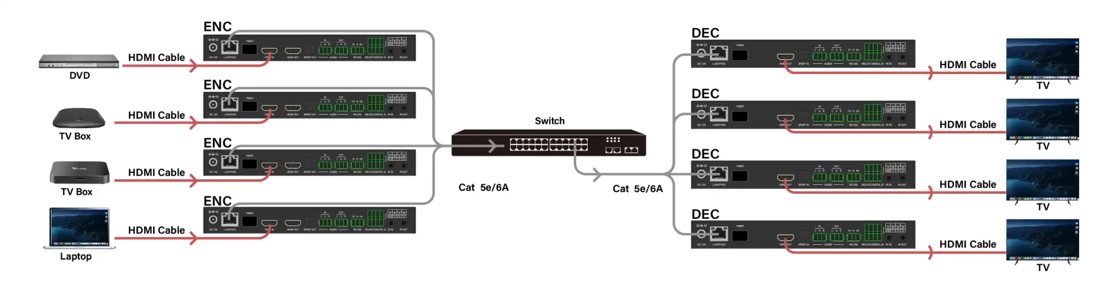
An IP-based system, commonly known as AV over IP, removes these physical limits. It operates by turning audiovisual signals into data packets that move across a regular Ethernet network. Then, these packets get reassembled into video and audio at the receiving end.
The Core Components
- Encoders:These devices take an HDMI or USB-C source and “packetize” it for the network.
- Decoders:These units pick up the stream from the network and turn it back into a signal for a display or projector.
- AV over IP Switch:This acts as the main center point. Unlike a standard dedicated switcher, a reliable managed AV over IP switch manages the direction of these data packets to various endpoints.
- Controller:A software or hardware tool that oversees the routing and setup of the whole system.
Why: Why Should Your Organization Transition to AV over IP?
Shifting to an IP-based video distribution system is not merely a passing fad. Instead, it serves as a smart improvement for any group looking ahead. The advantages cover simple setup, savings on costs, and strong results.
Unlimited Scalability and Flexibility
With a standard matrix, adding a 17th display to 16 existing ones might mean purchasing a whole new 32×32 matrix. However, AV over IP lets you just add another decoder and connect it to your current AV over IP switch. This building-block style suits expanding company sites, large store spaces, and up-to-date schools.
Breakthrough Distance Limitations
Regular HDMI cables find it hard to keep signal quality past 15 meters. Although HDBaseT pushes this to 100 meters, an IP-based video distribution system relies on common CAT6/7 or fiber optic lines. By using network boosters and switches, the reach becomes almost endless. As a result, you can send 4K material to spots on various levels or across separate structures.
Multi-Functional Integration
These setups go beyond basic sharing. They frequently blend in:
- Video Wall Management:Build huge screens (up to 9×9) without added processors.
- KVM Functionality:Manage far-off computers with a nearby keyboard, video, and mouse arrangement.
- Audio Embedding/De-embedding:Handle tricky audio paths next to video flows.
Which: Which AV over IP Standards Should You Choose?
Picking the proper protocol matters a lot for how well the system runs. Various AV over IP standards focus on aspects like data use, delay, and picture sharpness. Here is a look at the top standards backed by INFOBIT AV.
|
Protocollo |
Larghezza di banda di rete |
Latency Performance |
Resolution & Color |
Ideal Application Scenarios |
|
SDVoE |
10Gbps |
Zero (unnoticeable) |
4K60 4:4:4 |
Medical, High-end Command Centers |
|
JPEG 2000 |
1Gbps |
Ultra-low (<1 frame) |
4K60 4:4:4 |
Corporate, Higher Ed, Esports |
|
H.264 / H.265 |
Low (<50Mbps) |
Low to Medium |
4K30 or 1080P |
Mass distribution, Signage, Remote Learning |
How: How to Select the Correct AV over IP Switch?
In your IP-based video distribution system, the network switch stands out as the vital hardware part. It needs to be a managed type that can deal with intense “multicast” flow.
- IGMP Snooping:This feature makes sure video data goes only to decoders that ask for it. Thus, it stops the network from getting overwhelmed.
- Jumbo Frames:Backing for bigger data packets boosts efficiency when handling high detail 4K streams.
- PoE (Power over Ethernet):This lets the AV over IP switch supply power to encoders and decoders right through the network cable. In turn, it cuts the need for power sources at each display spot.
- Fiber and Copper Redundancy:In key settings, switches that work with both connection types keep things running if one path breaks down.
How: How Does INFOBIT AV Simplify the ProAV Experience?
INFOBIT goes beyond basic hardware. It forms a full tech setup aimed at making AV over IP easy to use and effective. By stressing “Zero-configuration” and designs that put users first, it tackles typical issues in network AV systems.
Product Deep-Dive: iSwitch Series Features
The iSwitch series shows the range of an IP-based video distribution system. If you require the exactness of SDVoE or the thrift of H.265, a tailored option exists.
|
Model SeriesEncoding |
Encoding Standard |
Primary Connectivity |
Advanced Functionality |
|
iSwitch-SDV |
10G SDVoE Transceiver |
Fiber & Copper |
Matrix, seamless switching, & 32-window multi-viewer |
|
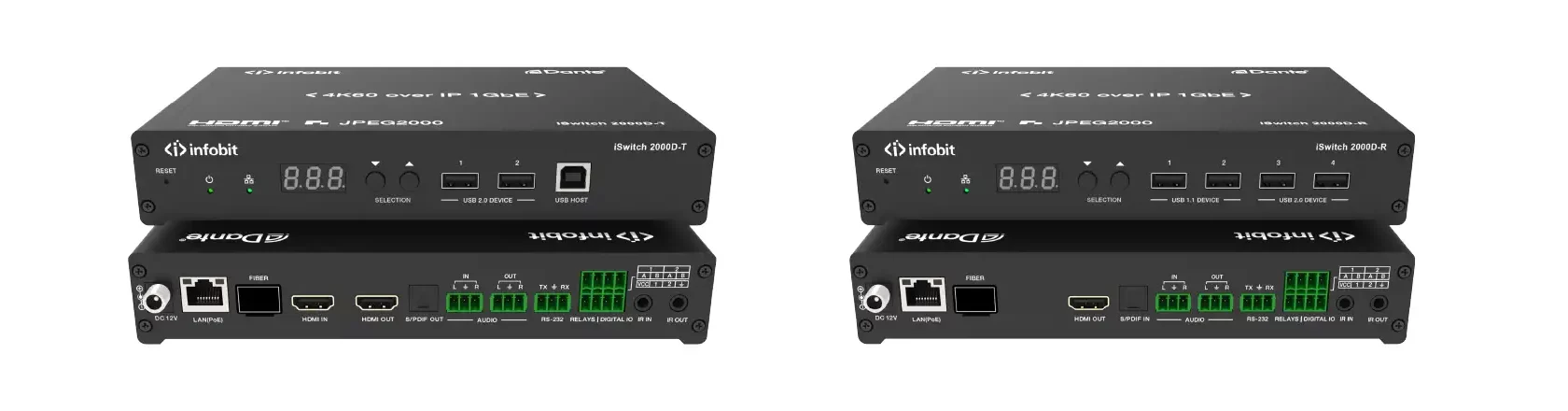
iSwitch 2000D |
1G JPEG 2000 |
Dante Integration |
Port redundancy & support for Dante professional audio |
|
iSwitch 265K |
H.265 efficiency |
Plug-and-Play |
Zero-configuration; visual control via tablet/cellphone |
|
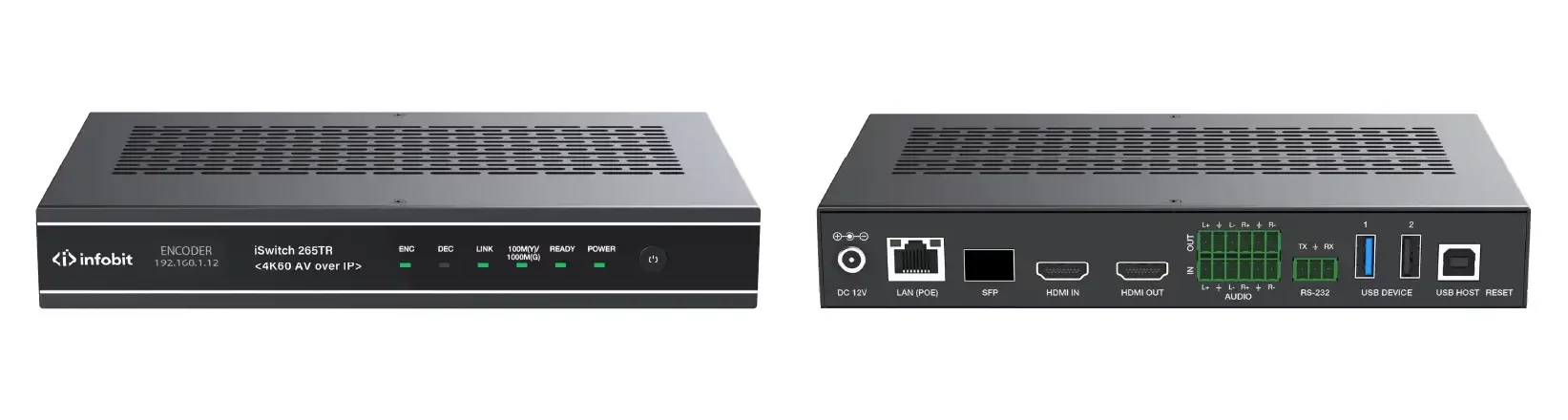
iSwitch 265TR |
4K60 Transceiver |
Fiber & Copper |
16-signal roaming, overlay, and arbitrary windowing |
Real-World Application: Case Study Reference
In today’s “Agile Collaboration” spaces, INFOBIT helps build mixed areas. For example, with the iSwitch 2000 series, groups have set up systems that manage both HDMI and USB-C inputs through auto-switching. This ensures that no matter if a speaker uses a laptop or a handheld device, the IP-based video distribution system processes the signal without issues.
FAQ
Q: Does an AV over IP system require a dedicated network?
A: You can run AV over IP on a shared company network with VLANs. Yet, for high-data AV over IP standards like SDVoE (10G), a dedicated or separate network works best. This avoids any effect on regular office data movement.
Q: What is the difference between an encoder and a decoder in an IP Based Video Distribution System?
A: The encoder is at the source, such as a PC or media player, and changes video into network data. Meanwhile, the decoder is at the display, like a TV or projector, and turns that data back into a video signal.
Q: Can I use any standard network switch for AV over IP?
A: No, not every switch fits. You require a “Layer 2 or Layer 3 Managed Switch” with IGMP Snooping support. Choosing a proven AV over IP switch guarantees that multicast video streams travel properly without network problems.
Q: Is there a noticeable delay (latency) when using IP-based systems?
A: The answer varies by standard. SDVoE provides “Zero Latency” (under 0.1ms), so it feels like a straight connection. On the other hand, H.264/265 involves more delay but uses far less bandwidth.
Q: Can an IP-based video distribution system handle 4K resolution?
A: Yes, it can. Current systems, especially those with JPEG 2000 or SDVoE standards, handle full 4K@60Hz at 4:4:4 color sampling. This delivers “visually lossless” or fully lossless quality.
Conclusion: Partnering for the Future of AV
Moving to an IP-based video distribution system marks a clear move toward a more adaptable and expandable digital setup. By selecting fitting AV over IP standards and a solid AV over IP switch, groups can prepare their systems for needs like 4K, 8K, and more.
INFOBIT AV keeps pushing forward with IP technology. It offers the resources to change how people link up. From a compact meeting room to a worldwide control hub, our group stands ready to assist in crafting a system that matches your company’s needs.
