




iSwitch 2000U-TR Demo Video
Check hardware intorduction of the iSwitch 2000U-TR...


Modern conference rooms require more than display equipment and power outlets. Businesses need reliable conference room connectivity solutions that allow users to connect laptops, share content, access networks, and charge devices efficiently. As a professional ProAV manufacturer, INFOBIT AV develops AV connection solution for meeting rooms that integrate AV, data, and power connections into professional workspaces. Our iBox Flex2 Modular Table Box System helps businesses create organized, flexible, and user-friendly conference room environments.
A modern conference room must support different devices and connection standards. During business meetings, users may need to connect laptops, displays, network equipment, and mobile devices. Without a suitable conference room connectivity solution, users often rely on additional adapters, extension cables, or temporary connection methods, which can reduce meeting efficiency.
A professional connectivity system should provide direct access to essential interfaces from the meeting table. The iBox Flex2 is an architectural-grade, in-desk connectivity solution designed to integrate power, data, and audio-visual ports directly into the workspace surface. Its modular design allows project teams to configure connection options according to different application requirements.
|
Connectivity Requirement |
iBox Flex2 Solution |
|
Display connection |
HDMI 2.0 module and HDMI switching module |
|
Laptop connection |
Full-feature USB-C module |
|
Network access |
RJ45 Ethernet module |
|
Device charging |
USB-A and USB-C 65W charging module |
|
Local power supply |
EU, UK, US, and universal power modules |
Meeting room cable management is an important part of conference room design. Loose cables on meeting tables can affect workspace appearance and make device connections less convenient. Businesses increasingly require solutions that provide easy access while keeping unnecessary wiring hidden.
Le iBox Flex2 helps solve this challenge through an embedded table design. The system is installed directly into the desktop surface, while connection ports remain concealed when not in use. It also supports under-table cable organization and retractable cable modules to improve meeting room cable management and maintain a cleaner workspace.
For companies designing executive meeting rooms, boardrooms, or collaborative spaces, an integrated desk connectivity system provides a more professional alternative to external adapters and cable extensions.
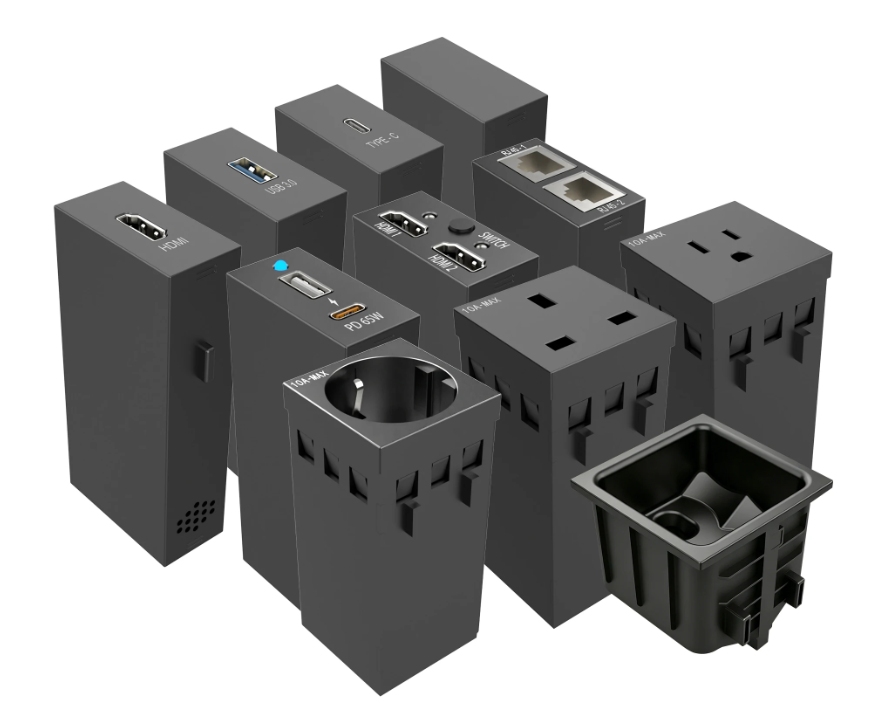
A complete conference room connectivity solution should combine different connection requirements into one organized system. Users need more than video output; they also require stable network access, device charging, and convenient power connections.
Le iBox Flex2 modular table box supports multiple connection modules, including HDMI, USB-C, USB-A, RJ45 Ethernet, and AC power outlets. This integrated approach simplifies device access and supports professional AV environments.
|
Module Type |
Fonction |
Specification |
|
HDMI 2.0 Module |
Video transmission |
Supports 4K |
|
HDMI Switching Module |
Multiple source switching |
2-to-1 switching, supports 4K60Hz |
|
USB-C Module |
Data and display connection |
Full-feature USB-C, 4K30Hz, 10Gbps |
|
RJ45 Module |
Wired network connection |
CAT6a S/FTP |
|
USB-A and USB-C Charging Module |
Device charging |
USB-C up to 65W, USB-A up to 18W |
Different meeting spaces require different connection combinations. A boardroom may prioritize presentation and video conferencing connections, while a training room may require multiple user access points.
A modular AV system allows integrators to select suitable interfaces based on project requirements. The iBox Flex2 base box supports eight standard modular unit spaces, enabling designers to combine different modules instead of using a fixed configuration.
This modular structure also supports future adjustments. When connection requirements change, businesses can replace individual modules rather than modifying the entire table installation.
A professional meeting room requires both functionality and visual consistency. External connection devices can occupy valuable workspace and affect the overall appearance of the room.
Le iBox Flex2 uses an in-desk installation method with a concealed interface design. When the ports are not needed, the table surface remains clean and organized. When users need to connect devices, the required interfaces can be accessed directly from the desktop.
Meeting rooms often represent a company’s professional image. A workspace with visible cables and temporary connection solutions may affect the overall user experience.
Le iBox Flex2 helps create a cleaner conference room environment by integrating connection points into the table structure. The hidden design reduces cable visibility while maintaining convenient access to essential interfaces.
Meeting participants need quick and reliable connections when presenting information. A suitable conference table connectivity box allows users to connect devices without searching for external connection points.
Le iBox Flex2 supports HDMI, USB-C, USB-A, and RJ45 modules to provide flexible device access. For projects requiring cable extension, retractable modules are available for HDMI, RJ45, USB-A, and USB-C connections. These modules provide up to 1,500 mm extension length from the desktop surface, helping users connect devices while maintaining cable control.
Technology standards continue to develop, and meeting rooms need flexible infrastructure. Fixed connection systems may require complete replacement when new connection types become necessary.
With a modular structure, the iBox Flex2 allows businesses to update selected connection modules according to changing requirements. This approach helps maintain a flexible conference room connectivity solution over time.
Executive meeting rooms require reliable connections while maintaining a professional appearance. A suitable conference table connectivity box should support presentations, device sharing, and power access without creating visible cable clutter.
Le iBox Flex2 provides HDMI, USB-C, RJ45, and power options in a single integrated system, making it suitable for professional meeting environments where appearance and functionality are both important.
Training rooms require flexible access because multiple users may need to connect different devices during sessions. A modular connectivity solution allows project designers to configure suitable interfaces based on the number of users and equipment requirements.
By combining different modules, organizations can create connection points that support presentations, device charging, and network access within the same workspace.
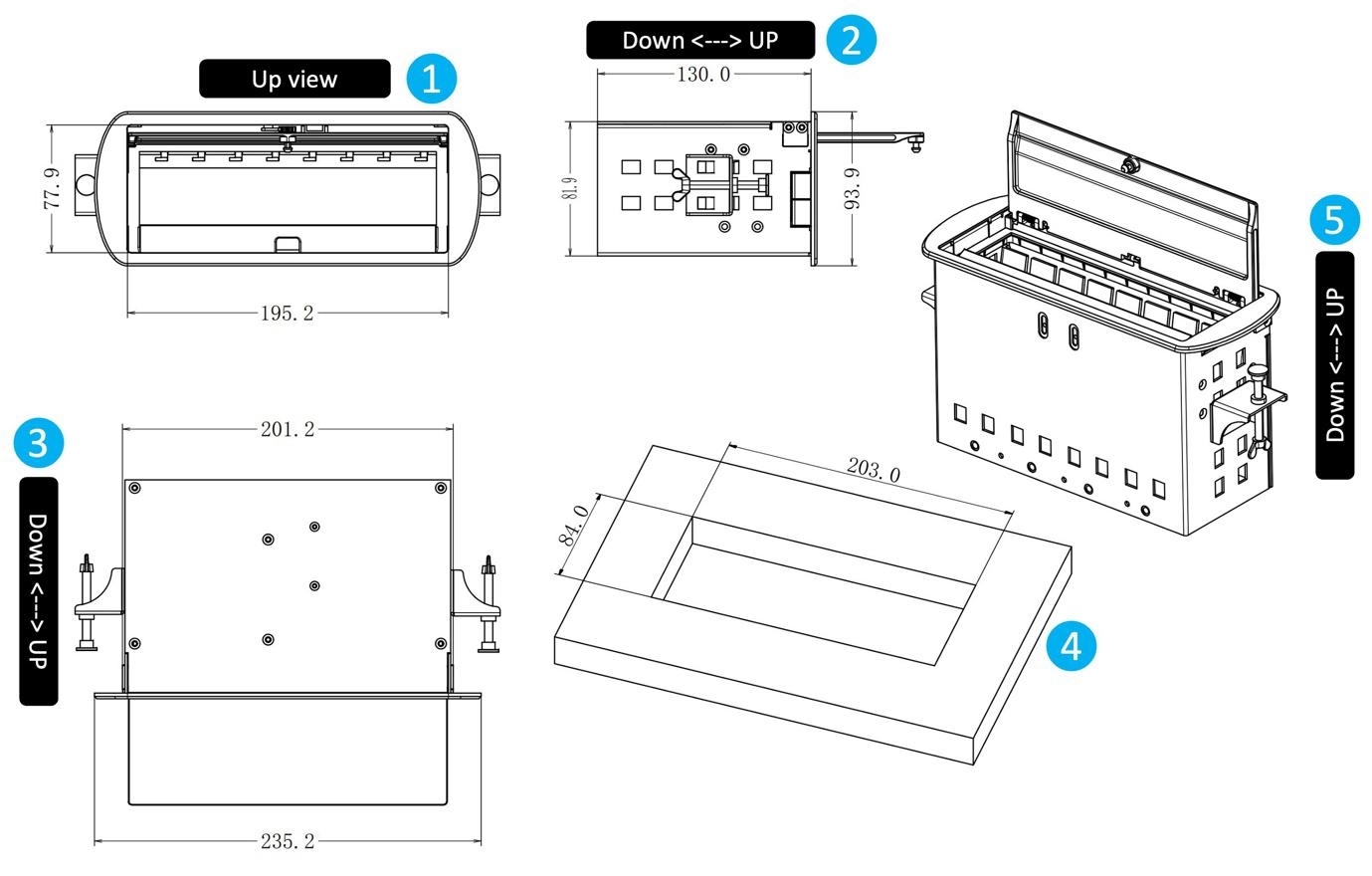
Proper installation planning ensures stable performance and a clean appearance. The required table cutout dimension of iBox Flex2 is 203 × 84 mm, and the system supports table thicknesses from 20–80 mm.
Before installation, project teams should confirm table structure, module requirements, and cable routing conditions.
Module selection should match the actual requirements of the meeting environment. Key factors include:
|
Selection Factor |
Consideration |
|
Display requirements |
HDMI connection and video output needs |
|
Device connection |
USB-C or USB-A compatibility |
|
Network requirements |
Stable wired Ethernet access |
|
Power requirements |
Charging and local power availability |
A well-planned configuration helps avoid unnecessary interfaces while ensuring users have the connections they need.
If you are planning a conference room upgrade or need a customized AV connection solution for meeting rooms, our team can help you select suitable modules and configurations based on your project requirements.
Contact INFOBIT AV for product consultation, technical support, or a project quotation.
A conference room connectivity solution integrates AV, data, and power interfaces into a meeting space. It allows users to connect devices more efficiently while improving workspace organization. Solutions such as iBox Flex2 combine HDMI, USB-C, USB, RJ45, and power modules into one desktop installation system.
The cost depends on the selected configuration, including the base box, module combination, and project requirements. Businesses can contact INFOBIT AV with their application details to receive a suitable recommendation and quotation.
Yes. The iBox Flex2 supports HDMI 2.0 modules and full-feature USB-C modules. The USB-C module supports 4K30Hz video output and 10Gbps data transmission, while HDMI modules support professional display connection requirements.
The system is installed into a desktop cutout. The recommended opening size is 203 × 84 mm, and compatible table thickness is between 20–80 mm. Modules are inserted into the base box based on project requirements.
Yes. INFOBIT AV provides ProAV products and technical support services for customers in Europe, North America, Asia Pacific, and other regions through its global network.
Veuillez laisser vos détails de demande ci-dessous afin que nous puissions vous contacter immédiatement.
