







iSwitch 402UC-L Demo Video
Check hardware intorduction of the iSwitch 402UC-L...


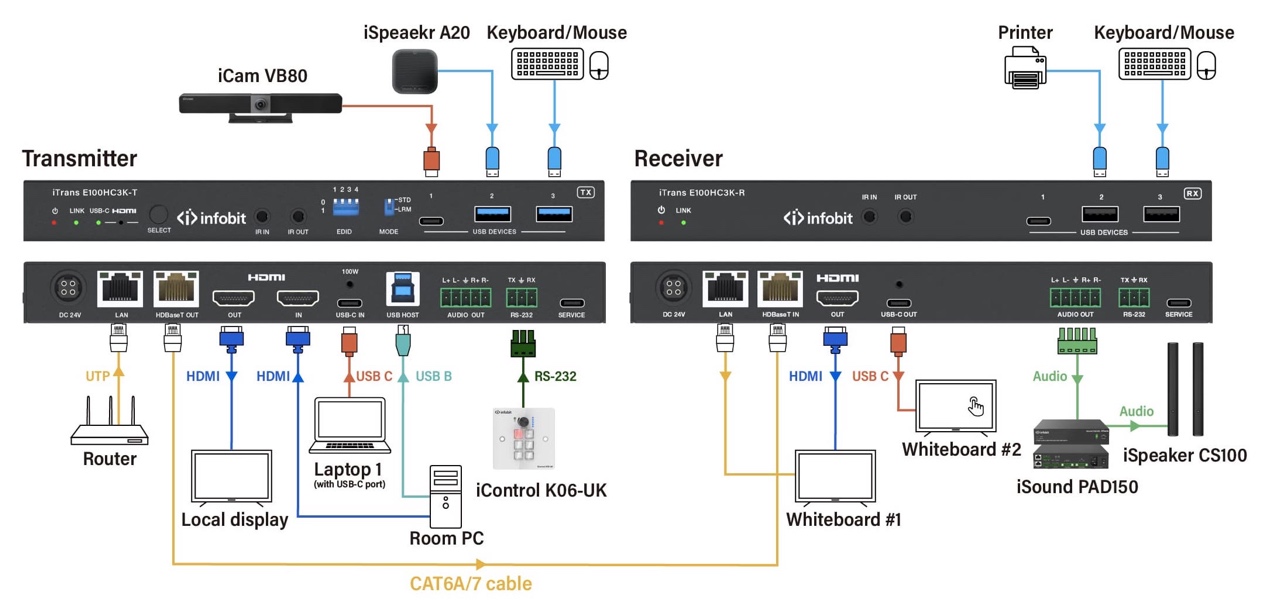
Fig1: INFOBIT AV iTrans E100HC3K diagram
Professional AV projects need stable signal extension, not just a longer cable. When a meeting room, classroom, control room, or display system requires HDMI over HDBaseT, the right HDBaseT extender must match resolution, distance, control, power, USB, audio, and installation requirements from the start.
Resolution should be checked before distance, price, or housing size. A basic HDBaseT HDMI extender may work for 1080p display extension, while a modern meeting room or lecture hall often needs 4K support, HDCP compatibility, HDR pass-through, and stable audio transmission.
INFOBIT AV iTrans E100HC3K is a clear example of 4K-focused projects. It supports video resolutions up to 4K2K@50/60Hz YUV444, 10-bit HDR pass-through, HDMI High Bit Rate audio pass-through, and bidirectional RS-232 control signal transfer with the HDMI signal. Its transmission distance is 100 meters at 1080P@60Hz and 40 meters at 4K2K@50/60Hz YUV444.
This matters in real B2B purchasing because “4K support” alone is not enough. Buyers should check whether the product supports the required frame rate, color format, HDCP version, HDR handling, audio format, and control path. A product listed as an HDMI Base T extender may not fit the project if it cannot support the display’s required signal format at the actual cable distance.
HDMI over HDBaseT is suitable when the source and display are too far apart for a clean HDMI-only installation. It also works well when the project needs control signals, PoC power, or USB device extension in the same cable path.
A conference table, wall display, projector, rack cabinet, and control panel are often installed in different places. Standard HDMI cabling may create cable clutter or unstable signal performance over long distances. An HDBaseT extender allows the system designer to place the HDBaseT transmitter near the source and the receiver near the display, while the main cable path runs through CAT infrastructure.
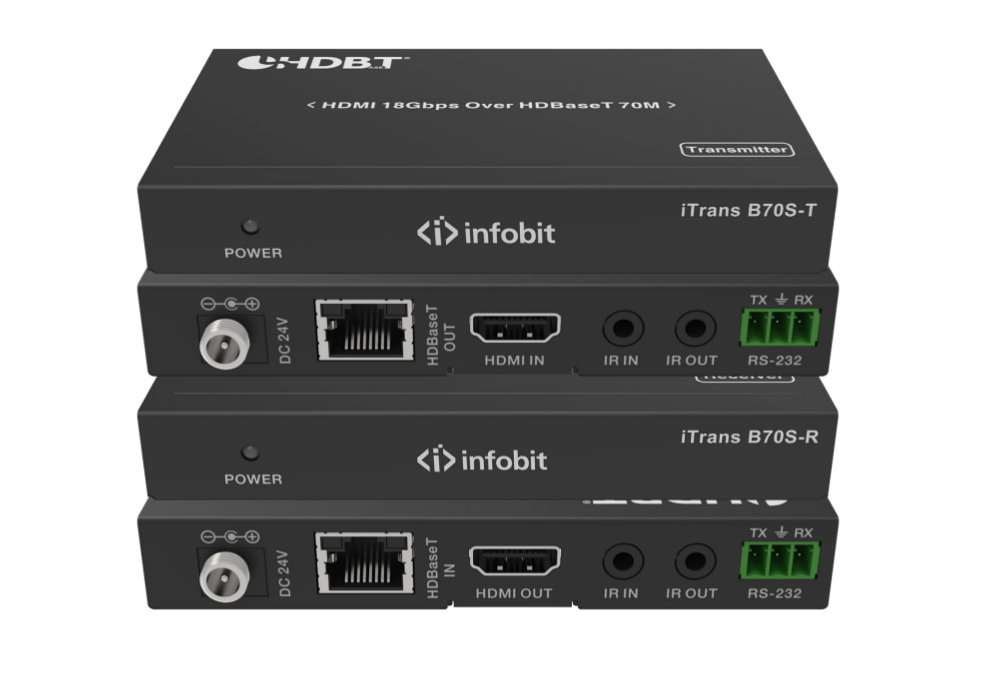
Distance should always be evaluated together with resolution. A system may run further at 1080p than at 4K. This is why a single “maximum distance” claim can mislead buyers if the quote does not specify the signal format.
|
Project Need |
Suitable INFOBIT «iVoice H300 (nouveau)» — INFOBIT AV Direction |
Key Data to Check |
|
Standard meeting room display |
iTrans E70C / E70S class |
1080p up to 70m, 4K distance limit depends on model |
|
4K60 point-to-point extension |
iTrans B70S / E100UC / E100HC class |
18Gbps, 4K@60Hz, HDCP, HDR, control support |
|
USB-C laptop plus HDMI source |
iTrans E100HC |
HDMI + USB-C input, USB 2.0, 60W USB-C charging |
|
Long 1080p reach |
iTrans E100HC long reach mode |
1080P 8bit up to 492ft/150m over CAT6A/7 |
|
Multi-display HDBaseT output |
iSwitch 104H150 / 108H150 |
1×4 or 1×8 HDBaseT distribution, 120m at 4K60, 150m at 1080P |
A complete HDBaseT extender is normally evaluated as a transmitter and receiver pair. The HDBaseT transmitter handles the source-side signal input, while the receiver provides output at the display side. Some projects also need HDMI loop out, USB host/device routing, IR, RS232, audio de-embedding, or ARC.
INFOBIT «iVoice H300 (nouveau)» — INFOBIT AV iTrans E100HC includes a transmitter with HDMI input, USB-C input, HDBaseT output, USB 2.0 host, and USB 2.0 client ports. Its receiver includes HDBaseT input, HDMI output, and USB device ports. The same product supports advanced EDID management, analog audio de-embedding on both TX and RX, and USB-A power up to 5V/500mA per port.
This structure is valuable in BYOD meeting rooms, training rooms, and hybrid collaboration spaces. A laptop may connect through USB-C, a fixed source may use HDMI, and room devices such as a USB camera, microphone, or speakerphone may need extension through the same system.
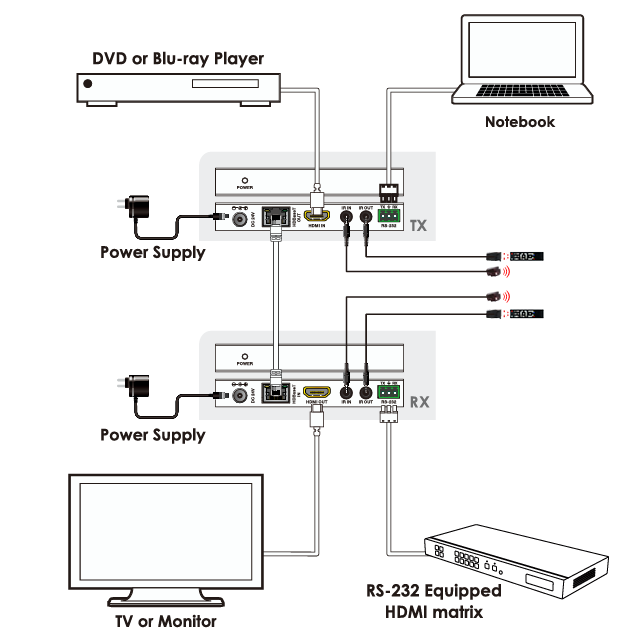
A single HDBaseT extender is suitable for one source and one display. A larger installation may need a splitter, presentation switcher, or matrix system with HDBaseT output.
INFOBIT «iVoice H300 (nouveau)» — INFOBIT AV iSwitch 104H150 is a 1×4 HDMI 18Gbps splitter with 150m HDBaseT, while iSwitch 108H150 is a 1×8 version. Both support video resolution up to 4K2K@60Hz 4:4:4, 120m at 4K2K@60Hz, 150m at 1080P@60Hz, HDMI loop output, IR and RS-232 routed to HDBaseT output, advanced EDID management, and PoC from transmitter to receiver.
This is the better direction when one source must feed several displays in classrooms, showrooms, command spaces, or signage areas. It also gives project buyers a cleaner system path than buying several unrelated point-to-point extenders.
A reliable quotation should include more than the model name. We recommend checking the input source type, display resolution, required cable distance, HDMI version, HDCP version, PoC method, IR and RS232 control, EDID management, USB needs, audio de-embedding, ARC, wall plate needs, and whether the system requires point-to-point extension or distribution.
INFOBIT AV is a ProAV manufacturer focused on audio-video transmission and switching, wireless collaboration systems, cables, and video wall control technology. We support project buyers who need product matching across extenders, presentation switchers, matrices, BYOD systems, KVM, AV over IP, Dante audio, cameras, microphones, and connectivity.
We help buyers match the extender to the real system design, including resolution, distance, power, control, and device connection requirements. For distributors and integrators, this reduces model mismatch, quotation delays, and installation rework.
For project selection, share your signal source, display model, required distance, cable type, USB device list, and control requirements with our team. You can review HDBaseT models on the INFOBIT AV product page or submit your project details through the INFOBIT AV contact page for model matching and quotation support.
Resolution and distance should be checked first. A buyer should confirm whether the project needs 1080p, 4K30, or 4K60, then match that requirement with cable distance, HDMI version, HDCP support, PoC, EDID, IR, RS232, USB, and audio needs.
It may be enough for a smaller room if the required resolution and cable path match the product specification. However, buyers should not judge only by “60m.” They should confirm whether the system needs 4K, USB, PoC, control pass-through, or USB-C laptop support.
Selected INFOBIT «iVoice H300 (nouveau)» — INFOBIT AV HDBaseT models support USB device extension for meeting-room devices. For example, iTrans E100HC supports USB 2.0 signal transmission, HDMI and USB-C inputs, and USB device ports, making it suitable for rooms that use USB cameras, microphones, or speakerphones.
Choose an HDBaseT splitter when one source must be distributed to several displays. INFOBIT «iVoice H300 (nouveau)» — INFOBIT AV iSwitch 104H150 et iSwitch 108H150 fit multi-display projects because they provide 1×4 or 1×8 HDBaseT output structures with long-distance transmission and control routing.
Prepare the source type, display resolution, transmission distance, cable type, installation format, control requirement, and USB/audio needs. Then send the project information through the INFOBIT AV contact page so the team can recommend a suitable model and quotation path.
Veuillez laisser vos détails de demande ci-dessous afin que nous puissions vous contacter immédiatement.
