






iSwitch 2000U-TR Demo Video
Check hardware intorduction of the iSwitch 2000U-TR...


Modern conference rooms rely on multiple connected AV devices, including displays, video conferencing systems, control processors, and network equipment. As AV systems become more integrated, power management has become an important part of installation planning. Choosing the right conference room PDU helps ensure reliable equipment operation, easier maintenance, and better control over connected devices.
A professional PDU is no longer only a power distribution device. For commercial AV projects, it works as a management interface that combines power control, energy monitoring, and system integration. As a professional AV solution provider, ইনফোবিট এভি develops smart power management solutions designed to support reliable operation and easier maintenance in modern AV environments. With features such as outlet-level control, metering data, TCP/IP management, and multiple control protocols, smart PDUs provide a more structured solution for modern meeting room equipment power control.
A conference room PDU is designed to distribute and manage electrical power for multiple devices installed in meeting spaces or AV racks. Unlike a standard power strip, a professional PDU provides additional control and monitoring functions that allow system integrators to manage connected equipment more efficiently.
In a typical conference room installation, several devices may require stable power connections:
|
AV Equipment |
Power Management Requirement |
|
Interactive displays |
Reliable power supply and remote restart capability |
|
Video conferencing systems |
Stable operation and easy troubleshooting |
|
Control processors |
Continuous power availability and network integration |
|
Network switches |
Centralized monitoring and protection |
|
Signal processors |
Individual outlet management |
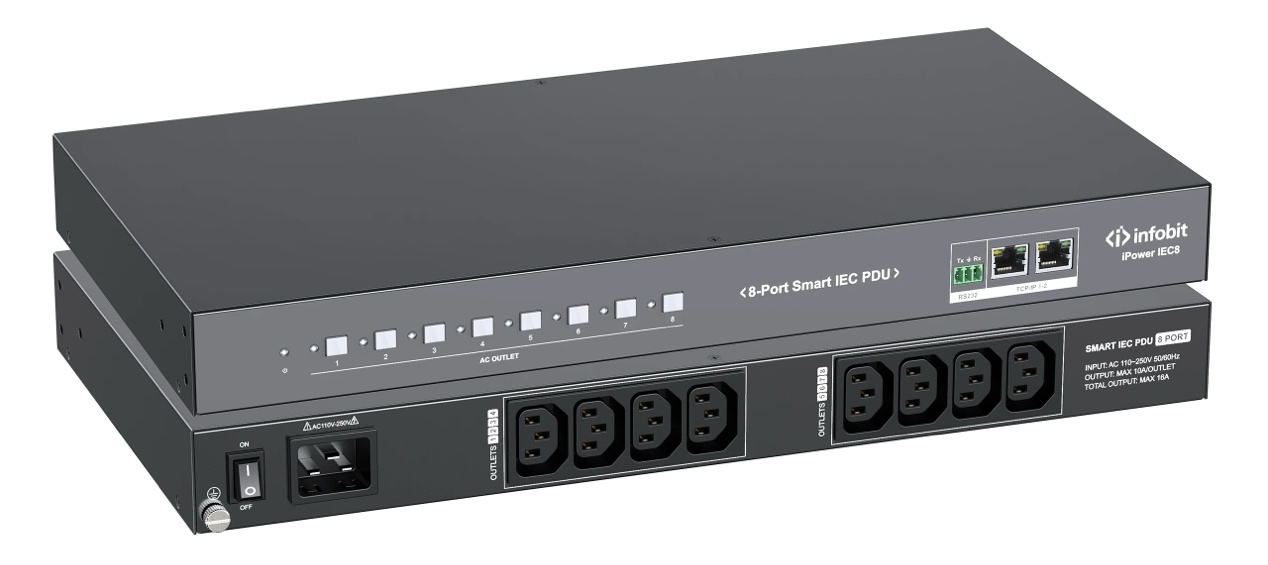
Developed by ইনফোবিট এভি, the iPower IEC8 is designed as an 8-port smart power delivery unit for professional applications. It supports AC 110V–250V input, provides eight IEC C13 output ports, and allows up to 10A output per port with a 16A total system capacity. This configuration makes it suitable for managing multiple AV devices inside conference room racks.
Selecting a PDU for a meeting room requires evaluating more than the number of outlets. AV integrators need to consider power capacity, control methods, monitoring functions, and compatibility with existing systems.
The first consideration is whether the PDU can support the number of devices required in the AV installation. A conference room with only a display and small control system may need fewer outlets, while larger rooms with video walls, processors, cameras, and network equipment require more structured power distribution.
A suitable PDU should provide enough outlets while maintaining safe electrical performance. INFOBIT AV’s iPower IEC8 includes eight individually controllable output channels, allowing integrators to manage different devices separately rather than powering all equipment through one connection.
When evaluating power capacity, project teams should review:
|
Specification |
Why It Matters |
|
Input voltage range |
Ensures compatibility with local electrical standards |
|
Maximum current capacity |
Prevents overload during operation |
|
Outlet rating |
Determines whether connected devices can operate safely |
|
Number of outputs |
Supports current and future equipment requirements |
A correct power capacity calculation helps avoid unexpected shutdowns and provides room for system expansion.
Remote control capability is one of the main differences between smart PDUs and traditional power distribution products. In commercial AV environments, technicians often need to manage equipment installed in different rooms or locations. Remote access reduces unnecessary physical intervention and simplifies maintenance procedures.
দ্য iPower IEC8 supports multiple control methods, including front panel buttons, RS-232, and Web-GUI control through TCP/IP connections. This allows system integrators to select the control method that matches the project environment.
For example:
|
নিয়ন্ত্রণ পদ্ধতি |
আবেদন |
|
Front panel buttons |
Local equipment management |
|
আরএস -২৩২ |
Integration with AV control systems |
|
TCP/IP Web-GUI |
Remote configuration and monitoring |
Network-based control is especially valuable for enterprises managing multiple conference rooms because technicians can access power information without entering each room.
Power monitoring provides visibility into how connected AV equipment operates. Without monitoring functions, technicians have limited information when troubleshooting equipment issues or analyzing energy consumption.
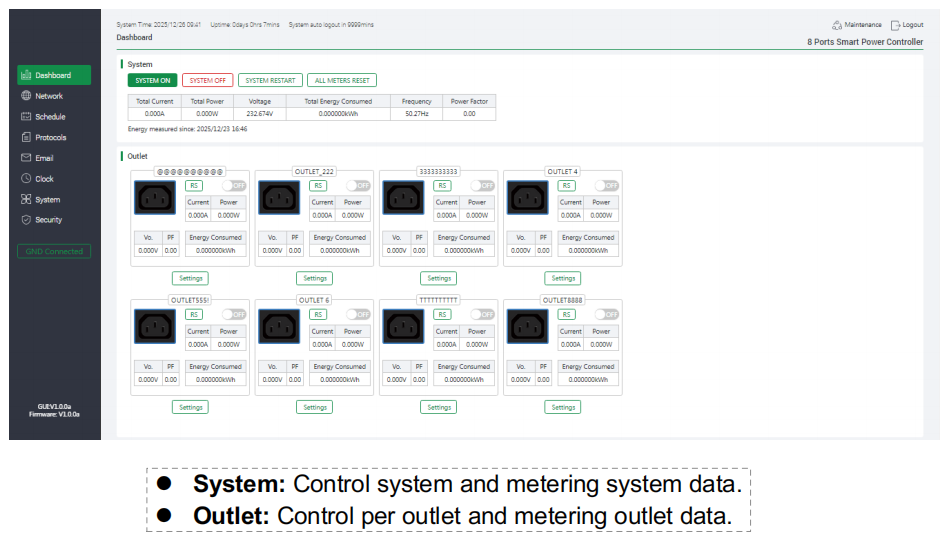
A professional PDU should provide measurement data such as voltage, current, power consumption, and energy usage. INFOBIT AV’s iPower IEC8 supports system-level and outlet-level metering, allowing users to view electrical information from both the overall system and individual outlets.
|
Monitoring Data |
Value for AV Projects |
|
Voltage monitoring |
Helps identify abnormal electrical conditions |
|
Current monitoring |
Supports load management |
|
Power consumption data |
Provides equipment usage visibility |
|
Outlet-level data |
Helps identify specific device conditions |
This information supports preventive maintenance and helps integrators manage AV systems more effectively.
Modern conference rooms are increasingly connected with building management platforms and centralized control systems. Therefore, compatibility with common communication protocols is an important factor when selecting a PDU.
দ্য iPower IEC8 supports network protocols including SNMP, Telnet, MQTT, SSH, and Modbus TCP, enabling connection with different management platforms.
For large commercial projects, protocol support provides advantages such as:
A PDU with flexible communication options can adapt better to different AV project requirements.
Conference room AV equipment often includes expensive electronic devices, making electrical protection an important consideration. A professional PDU should include protection functions to reduce risks caused by abnormal electrical conditions.
দ্য iPower IEC8 includes overload protection, wiring error protection, and remote login verification features to improve operational safety.
Important protection features include:
|
Protection Function |
Purpose |
|
Overload protection |
Helps prevent excessive electrical load |
|
Current threshold settings |
Allows customized power management |
|
Voltage threshold settings |
Supports voltage condition monitoring |
|
Remote verification |
Improves management security |
These features help protect connected AV equipment and improve long-term system reliability.
AV racks usually contain multiple devices from different manufacturers. Without structured power management, troubleshooting and maintenance can become time-consuming.
A smart PDU provides a centralized approach by combining power distribution, control, and monitoring in one device. Instead of manually checking individual devices, technicians can review power status and control outlets through available management interfaces.
দ্য iPower IEC8 provides a Web-GUI dashboard for system and outlet management, including network configuration, scheduling functions, and device monitoring. This allows AV professionals to create more efficient maintenance processes.
Smart PDU solutions are especially useful for:
Many AV projects focus heavily on visible equipment such as displays and cameras while overlooking power infrastructure. Selecting an unsuitable PDU can create limitations during installation and future maintenance.
Common mistakes include:
More outlets do not always mean better performance. The PDU must also match the required current capacity, control method, and integration requirements.
For projects with multiple conference rooms, local-only control may increase maintenance difficulty. Network-based management provides better flexibility.
A PDU should work with the existing AV control environment. Protocol support can affect future system upgrades and integration possibilities.
Conference rooms often receive technology upgrades over time. Selecting a scalable PDU helps avoid replacing power infrastructure when additional devices are installed.
Conference room AV systems are becoming more complex, and power management needs to evolve with them. A professional smart PDU provides more than electrical distribution. It creates a connection between power infrastructure and AV system management.
With independent outlet control, metering capability, network connectivity, and protection functions, smart PDUs help AV integrators build more reliable and manageable installations.
For companies planning conference room upgrades or large-scale AV deployments, selecting the right PDU should be part of the overall system design process rather than an afterthought.
To discuss your AV power management requirements, request a solution consultation or submit your project details through INFOBIT official website for professional support and product recommendations.
The required number of outlets depends on the AV equipment installed in the room. Projects should consider current devices, future expansion, and power capacity requirements rather than outlet quantity alone.
Yes. Smart PDUs with RS-232, TCP/IP, and network protocol support can integrate with professional AV control environments. The iPower IEC8 supports RS-232 and TCP/IP control methods.
Key features include outlet quantity, power capacity, remote control options, metering capability, protocol support, and safety protection functions.
দয়া করে নীচে আপনার চাহিদার বিবরণ ছেড়ে দিন যাতে আমরা অবিলম্বে আপনার সাথে যোগাযোগ করতে পারি।
