





Le bureau contemporain a connu un changement majeur. Il s'est éloigné des configurations de bureau rigides pour des paramètres de travail flexibles et mixtes. Dans cette période actuelle, "Apportez votre propre appareil" n'est plus seulement un avantage supplémentaire. Au lieu de cela, il est devenu une exigence standard pour les travailleurs qui veulent un accès rapide et confort avec leurs outils de travail. Cependant, comme les gadgets individuels entrent plus souvent dans les espaces professionnels, les entreprises font face à un conflit clé entre l'efficacité du personnel et la protection de l'information d'entreprise. Créer une politique de dispositif BYOD bien planifiée, soutenue par un système fiable Système de présentation sans filest la meilleure approche pour gérer cette situation. Lorsque les entreprises combinent des règles simples avec un équipement fiable, elles peuvent transformer le désordre possible des gadgets incontrôlés en un système de travail d’équipe efficace et productif.
Qu'est-ce qu'une politique de dispositif BYOD et pourquoi est-elle essentielle aujourd'hui?
Une politique actuelle sur les appareils BYOD va au-delà d'une approbation de base pour que le personnel utilise son propre équipement. Il forme une structure complète qui décrit comment la technologie privée se connecte aux systèmes de l'entreprise, aux informations confidentielles et aux configurations de conférence communes. Comme les modèles de travail mixtes sont maintenant courants, la ligne entre le travail et les outils personnels est devenue floue. S’il n’y a pas de politique officielle en place, les équipes technologiques sont confrontées à des défis avec l’informatique ombre. Cela se produit lorsque les applications et les appareils non surveillés entraînent de graves lacunes de sécurité.
Le besoin de ce type de politique vient de la croissance rapide de la pratique BYOD. De nos jours, les travailleurs comptent sur leurs téléphones comme moyen principal de participer à des réunions vidéo, de vérifier rapidement les fichiers et même de gérer les écrans dans les salles. Une politique solide s'assure que ces téléphones suivent des mesures de sécurité telles que le codage des données et les règles d'entrée. En conséquence, il arrête les fuites d'informations indésirables. En même temps, il conserve la facilité de « connecter et partager » que les gens attendent. Sans un tel contrôle, une entreprise est confrontée non seulement aux risques de violations d'information, mais aussi à des retards importants dus à des décalages technologiques lors de pourparlers importants.
Pourquoi les entreprises devraient-elles investir dans des solutions de gestion BYOD professionnelles?
La gestion d'un groupe varié d'appareils, des différents types de Windows et macOS aux différentes versions d'Android et d'iOS, nécessite plus que des lignes directrices de base. Il nécessite des solutions de gestion BYOD dédiées. Ces outils offrent la surveillance unifiée dont les équipes techniques ont besoin pour surveiller les points de lien et confirmer que chaque gadget rejoignant la zone de conférence est vérifié et sécurisé.
Un des principaux avantages des solutions de gestion BYOD professionnelles est de se débarrasser du « désordre du câble ». Dans les anciens systèmes, les gens passent souvent les dix premières minutes d’une session à la recherche du bon connecteur HDMI ou USB-C. Les appareils de travail en équipe sans fil de haute qualité fonctionnent comme un lien commun. Ils permettent à n'importe quel gadget d'envoyer immédiatement du matériel à l'écran principal. INFOBIT AV est devenu un acteur de premier plan dans ce domaine. Il met l'accent sur la compatibilité ProAV, de sorte que les outils personnels fonctionnent sans problème avec les murs vidéo haut de gamme et les caméras de réunion. Cela se produit sans avoir besoin de configurations logicielles délicates.
|
Caractéristique de gestion |
Avantages de l'entreprise |
|
Surveillance centralisée |
Visibilité en temps réel des connexions actives et de la santé du matériel |
|
Support multiplateforme |
Compatibilité transparente entre Windows, macOS, Android et iOS |
|
Isolation réseau |
Séparation des réseaux invités et d'entreprise pour protéger les actifs sensibles |
|
Mises à jour automatisées du firmware |
Assure que tous les nœuds de salle de réunion sont protégés contre les dernières menaces |
Comment iShare X400 Pro standardise-t-il la collaboration sans fil ?
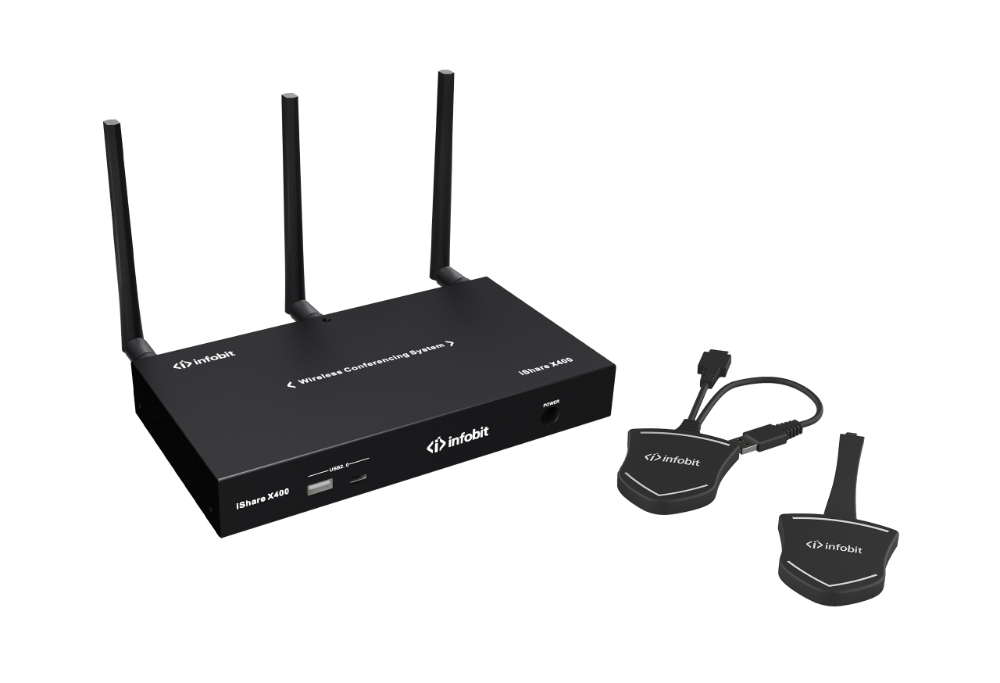
Pour qu'une politique de dispositif BYOD fonctionne bien, l'équipement doit être aussi simple que les programmes. L'iShare X400 Pro, fonctionnant comme un appareil haute performance Commutateur sans fil BYOD BYOMagit comme le support matériel principal pour tout plan BYOD de smartphone. Il permet aux utilisateurs de se connecter, de sélectionner et de partager. Cela élimine les obstacles techniques qui perturbent souvent le travail d'équipe. Le système gère l'entrée 4K 60Hz, ce qui donne les images nettes et de haute qualité nécessaires pour les contrôles de données et les évaluations de conception.
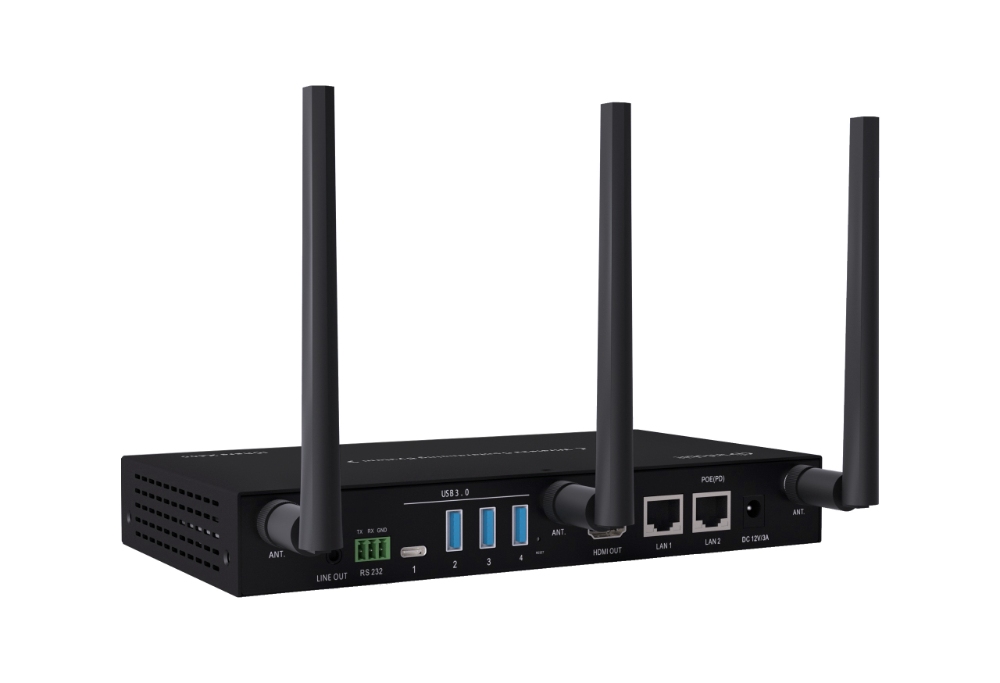
L'iShare X400 Pro est conçu pour les paramètres avec plusieurs utilisateurs. Il permet d'afficher jusqu'à quatre sections à la fois sur un écran. Cela en fait un excellent choix pour les choix d'équipe où différentes sources d'information doivent apparaître à côté les unes des autres. Du point de vue de la sécurité, il s'adapte parfaitement à une politique de dispositif BYOD de l'entreprise. Il assure la protection des données sans fil et fonctionne sur des parties réseau séparées. Ainsi, les conférenciers en visite peuvent partager du matériel sans accéder au serveur interne principal.
- Transmission sans fil 4KOffrant des images nettes et sans retard à 60Hz.
- Split multi-écranPrise en charge de 1, 2 ou 4 fenêtres sur un seul écran.
- Support BYOMPermet à l’ordinateur portable de l’utilisateur d’héberger sans fil l’appareil photo et le micro de la salle pour Teams ou Zoom.
- WiFi double bandeSupport 2.4G/5G haute vitesse pour des connexions stables et à grande bande passante.
Quel rôle joue un contrôleur de mur vidéo dans le BYOD à grande échelle?
Dans les zones de présentation de leadership, les centres de contrôle ou les grandes zones de travail d’équipe, un écran n’est généralement pas suffisant. Ici, un contrôleur de mur vidéo devient une partie essentielle des solutions de gestion BYOD. Lorsque plusieurs personnes participent à un processus BYOD de smartphone, un mur vidéo offre une visualisation à grande échelle. Par exemple, le contrôleur de mur vidéo iWall 206 peut gérer des sorties claires dans des configurations comme 2× 3 or 1× 6 arrangements.
Lorsque vous combinez l'iWall 206 avec la technologie de partage sans fil, une entreprise peut afficher le contenu du téléphone à côté des entrées AV professionnelles ou des flux de données en temps réel. Ce type de croissance assure que la politique de dispositifs BYOD atteigne les configurations d'affichage les plus avancées de l'entreprise. L'option d'ajuster la taille, la couche et de placer les sources BYOD sur une vaste surface crée un style de conversation plus vivant et convaincant. À son tour, il transforme une session régulière en une rencontre d'information attrayante.
|
Type de matériel |
Rôle dans la stratégie BYOD |
|
Récepteur sans fil (iShare X) |
Facilite la connexion instantanée pour les utilisateurs mobiles et portables |
|
Contrôleur de mur vidéo (iWall) |
Gére et échelle plusieurs entrées BYOD sur de grands écrans |
|
Logiciel de gestion |
Gére les autorisations, la sécurité et le dépannage à distance |
|
Dongles de connectivité |
Fournit une fonctionnalité « plug-and-play » pour les appareils sans coulée native |
Comment mettre en œuvre une politique de dispositif BYOD sans sacrifier l'expérience utilisateur?
Les meilleures solutions de gestion BYOD sont celles qui n’ont pas besoin de courbe d’apprentissage. Si une politique de dispositif BYOD semble trop stricte ou si l'équipement est trop difficile à utiliser, le personnel cherchera des raccourcis qui affaiblissent la sécurité. L’objectif est de construire un design axé sur les utilisateurs, où la technologie ne s’en empêche pas.
Pour la mettre en œuvre, concentrez-vous sur trois domaines principaux.
- Définir le paramètre de limiteÉtablir des règles d’utilisation acceptable qui définissent clairement quelles données peuvent être consultées via des appareils personnels.
- Onboarding technique sans coutureUtilisez du matériel comme iShare qui utilise des protocoles natifs (AirPlay, Miracast, Chromecast) afin que les utilisateurs ne’ t doivent télécharger des applications externes pour smartphone BYOD.
- Proofing pour le BYOMPasser du simple partage de contenu à « Bring Your Own Meeting » (BYOM), où l’appareil personnel de l’utilisateur héberge toute la session de communication unifiée (UC).
En assortissant ces méthodes, les leaders technologiques peuvent garantir le respect des règles. En même temps, ils peuvent grandement augmenter la satisfaction des travailleurs. Lorsque l’équipement soutient la politique – au lieu de s’y opposer – l’entreprise obtient un avantage clair en termes de rapidité et de rythme.
Conclusion
Le mélange de technologie téléphonique et AV pro a transformé une solide politique de dispositifs BYOD en une partie clé de la configuration de l’entreprise d’aujourd’hui. En acceptant la tendance BYOD pour smartphones et en la soutenant avec des solutions de gestion BYOD unifiées, les groupes peuvent créer un cadre pour de nouvelles idées en douceur. Lorsque vous associerez le contrôle planifié à un équipement avancé, les informations restent protégées. Pendant ce temps, le travail d’équipe se déroule mieux qu’auparavant. Mettre de l’argent dans ces outils n’est pas seulement une amélioration technologique. C’est une promesse pour une entreprise plus rapide et plus connectée demain, où votre groupe peut faire de son mieux avec les appareils qu’il connaît bien.
Prêt à transformer vos espaces de réunion avec la technologie sans fil gagnante du championnat? Explorez la gamme complète de solutions AV INFOBIT pour construire une base solide pour votre entreprise moderne.
FAQ (questions fréquentes)
Q : Quels sont les principaux risques de sécurité liés à l’absence d’une politique de dispositif BYOD ?
R : Sans une politique formelle sur les appareils BYOD, les entreprises sont confrontées à des dangers tels que le vol d’informations, la propagation de virus à partir de gadgets non contrôlés et l’entrée illégale dans les systèmes internes. Les solutions de gestion BYOD unifiées réduisent ces problèmes. Ils le font en appliquant la vérification et en séparant les flux de visiteurs des informations clés de l'entreprise.
Q: Puis-je partager du contenu de mon téléphone sur un mur vidéo professionnel?
R: Oui, avec un dispositif BYOD de smartphone utilisant la technologie iShare, vous pouvez rapidement envoyer votre écran à un récepteur. Lorsque vous l'associerez à un contrôleur iWall, ce matériel de téléphone peut croître et apparaître à côté d'autres entrées sur une grande configuration multi-écran.
Q : La politique sur les appareils BYOD s’applique-t-elle aux présentateurs invités ?
R: Une politique complète sur les appareils BYOD devrait couvrir une partie pour les visiteurs. Les meilleures solutions de gestion BYOD permettent aux clients de partager des matériaux via des connecteurs d'engrenages ou des liens WiFi pour les visiteurs. Cela les éloigne des documents privés de l’entreprise. Pourtant, ils peuvent encore bien se présenter.
Q: Un logiciel spécial est-il nécessaire pour le BYOD de smartphone dans la salle de conférence?
R : Des solutions avancées de gestion BYOD avec des méthodes intégrées comme AirPlay, Miracast et Chromecast. Cela permet une configuration BYOD régulière de smartphone où les utilisateurs n'ont généralement pas besoin d'ajouter de programmes supplémentaires pour commencer à partager leur écran.
Q : Comment le BYOD améliore-t-il le ROI d’une salle de réunion ?
R : En mettant en place une politique claire sur les appareils BYOD et les équipements sans fil, les entreprises réduisent le temps perdu pour la préparation technologique (environ 10 à 12 minutes par session). Ce meilleur flux, associé à moins de dépenses pour les fils et les connecteurs, augmente considérablement le rendement total des dépenses pour les zones de travail en équipe.
